This is the full developer documentation for Railpack
# Railpack
> Zero-config application builder that automatically analyzes your code and turns it into an image
## Features
[Section titled “Features”](#features)
Zero-config
Support for Node, Python, Go, PHP, Java, Ruby, and more out of the box. First class support for Vite, Astro, Next.js, and CRA static sites.
Built on BuildKit
Efficient image construction using BuildKit LLB. Implemented as a custom frontend.
Configure your site
Customizable through environment variables or a config file.
Read the docs
Learn more in [the Railpack Docs](/getting-started).
# Getting Started
> How to get up and running with Railpack
The easiest way to use Railpack is to deploy on a platform like Railway. Builds should work out of the box with minimal configuration. From there, you can see the docs for each language that Railpack supports.
* [Node](languages/node)
* [Python](languages/python)
* [Go](languages/golang)
* [PHP](languages/php)
* [HTML](languages/staticfile)
* [Java](languages/java)
* [Ruby](languages/ruby)
* [Dotnet](languages/dotnet)
* [Deno](languages/deno)
* [Rust](languages/rust)
* [Elixir](languages/elixir)
* [Gleam](languages/gleam)
* [C/C++](languages/cpp)
* [Shell scripts](languages/shell)
***
If you want to run Railpack locally, follow the steps below. Follow [this guide](/platforms/running-railpack-in-production) if you want to run Railpack on a platform in production.
## Installation
[Section titled “Installation”](#installation)
Install Railpack on Mac or Linux from GH releases ([or install with another method](/installation)).
```sh
curl -sSL https://railpack.com/install.sh | sh
```
Confirm that Railpack is installed correctly:
```sh
railpack --help
```
## Help
[Section titled “Help”](#help)
Need help? Check out our [Help page](/help) for support options.
## Building
[Section titled “Building”](#building)
Before building, you need to have a BuildKit instance running and available through the `BUILDKIT_HOST` environment variable. The easiest way to do this is to run a BuildKit instance as a container:
```bash
mise run setup
```
Now you can build your image using Railpack:
```sh
railpack build ./path/to/project
```
*(there are many examples in the [Railpack repo](https://github.com/railwayapp/railpack/tree/main/examples) that you can test with)*
# Installation
> How to install Railpack
Railpack is available as a CLI tool. The latest release is available [on GitHub](https://github.com/railwayapp/railpack/releases).
The BuildKit frontend is available as a [Docker image on GHCR](https://github.com/railwayapp/railpack/pkgs/container/railpack-frontend).
## Mise
[Section titled “Mise”](#mise)
We love mise, and you can install Railpack using mise:
```sh
mise use github:railwayapp/railpack@latest
```
## Curl
[Section titled “Curl”](#curl)
Download Railpack from GH releases and install automatically
```sh
curl -sSL https://railpack.com/install.sh | sh
```
You can also customize the version, destination, and other config options:
```sh
curl -sSL https://railpack.com/install.sh |
RAILPACK_VERSION=0.2.3 sh -s -- --bin-dir ~/.local/bin
```
## GitHub Releases
[Section titled “GitHub Releases”](#github-releases)
Go to the [latest release](https://github.com/railwayapp/railpack/releases) and download the `railpack` binary for your platform.
## From Source
[Section titled “From Source”](#from-source)
```sh
git clone https://github.com/railwayapp/railpack.git
cd railpack
go build -o railpack ./cmd/...
./railpack --help
```
## Supported Platforms
[Section titled “Supported Platforms”](#supported-platforms)
Linux and MacOS are supported.
Windows builds are generated but not officially supported. That being said, PRs are welcome to fix any Windows-specific bugs.
## Agent Skill
[Section titled “Agent Skill”](#agent-skill)
The repository includes an [Agent Skill](https://agentskills.io) that teaches compatible coding agents how to configure `RAILPACK_*` variables, construct `railpack.json`, and run builds locally.
Install it for the current project with the [Skills CLI](https://skills.sh/docs/cli):
```sh
npx skills add railwayapp/railpack --skill railpack
```
## Help
[Section titled “Help”](#help)
Need help? Check out our [Help page](/help) for support options.
# Environment Variables
> Understanding environment variables in Railpack
Some parts of the build can be configured with environment variables. These are often prefixed with `RAILPACK_`.
## Build Configuration
[Section titled “Build Configuration”](#build-configuration)
| Name | Description |
| ------------------------------ | ------------------------------------------------------------------------------------------------------------------------------------------------------------------------------- |
| `RAILPACK_BUILD_CMD` | Set the command to run for the build step. This overwrites any commands that come from providers |
| `RAILPACK_INSTALL_CMD` | Set the command to run for the install step. This overwrites any commands that come from providers. All files are copied to the root of the project before running the command. |
| `RAILPACK_START_CMD` | Set the command to run when the container starts |
| `RAILPACK_PACKAGES` | Install additional Mise packages. In the format `pkg[@version]`. The version is optional; if not provided, the latest version is used. Allows list. |
| `RAILPACK_BUILD_APT_PACKAGES` | Install additional Apt packages during build. Allows list. |
| `RAILPACK_DEPLOY_APT_PACKAGES` | Install additional Apt packages in the final image. Allows list. |
| `RAILPACK_DISABLE_CACHES` | Specify specific BuildKit cache keys to disable, or `*` to disable all caches. Allows list. |
Variables which allow a list use space-separated values. For example:
```sh
RAILPACK_PACKAGES="pipx:httpie jq@latest"
```
To configure more parts of the build, it is recommended to use a [config file](/config/file).
## Global Options
[Section titled “Global Options”](#global-options)
These environment variables affect the behavior of Railpack:
| Name | Description |
| ------------------ | ------------------------------------------------------- |
| `FORCE_COLOR` | Force colored output even when not in a TTY |
| `RAILPACK_VERBOSE` | Enable verbose logging (equivalent to `--verbose` flag) |
# Excluding Files
> How to exclude files from your build using .dockerignore
Railpack supports the standard `.dockerignore` file syntax to exclude files from your build. For a complete reference on the syntax, please refer to the [official Docker documentation](https://docs.docker.com/build/building/context/#dockerignore-files).
## How .dockerignore Works
[Section titled “How .dockerignore Works”](#how-dockerignore-works)
When you use a `.dockerignore` file, Railpack parses it and passes all patterns (including negations) to BuildKit in a single `exclude` list. BuildKit’s native pattern matching handles both exclusions and negations (lines starting with `!`).
Unlike `.gitignore`, `cache/` and `cache` are equivalent and can exclude either a file or a directory.
### Example
[Section titled “Example”](#example)
Given a `.dockerignore` file:
```plaintext
**/node_modules
.env
*.log
!important.log
```
When you run `railpack build --show-plan`, you’ll see this gets converted to:
```json
{
"exclude": [
"**/node_modules",
".env",
"*.log",
"!important.log"
],
"steps": [...],
"deploy": {...}
}
```
## Using railpack.json
[Section titled “Using railpack.json”](#using-railpackjson)
You can also specify `exclude` patterns directly in your `railpack.json` configuration file instead of (or in addition to) using `.dockerignore`. Negation patterns (starting with `!`) can be included in the `exclude` array:
```json
{
"exclude": [
"**/node_modules",
"**/.venv",
"*.log",
".env",
"!important.log"
],
"deploy": {
"startCommand": "node server.js"
}
}
```
This gives you more control and allows you to manage all build configuration in one place. If both `.dockerignore` and `railpack.json` exclude patterns are present, they are merged together.
## Default Behavior
[Section titled “Default Behavior”](#default-behavior)
If no `.dockerignore` file is present in your project root, Railpack defaults to including **all files** in the build context.
## Common Patterns
[Section titled “Common Patterns”](#common-patterns)
### Excluding Nested Directories
[Section titled “Excluding Nested Directories”](#excluding-nested-directories)
A common gotcha: patterns without wildcards only match at the root level.
```plaintext
# Only excludes /node_modules (root level)
node_modules
# Excludes node_modules at ANY nesting level
**/node_modules
```
For example, if you have this structure:
```plaintext
project/
├── node_modules/ ← excluded by both patterns
└── web/
└── node_modules/ ← only excluded by **/node_modules
```
Use `**/` prefix to match directories at any depth. This applies to all directory names: `**/node_modules`, `**/.venv`, `**/vendor`, etc.
## Best Practices
[Section titled “Best Practices”](#best-practices)
### Local Development Artifacts
[Section titled “Local Development Artifacts”](#local-development-artifacts)
If you run builds locally, exclude local environment folders like `node_modules`, `.venv`, or `vendor` at all nesting levels using the `**/` prefix.
### Secrets and Metadata
[Section titled “Secrets and Metadata”](#secrets-and-metadata)
You should exclude sensitive files and version control metadata to keep your image clean, small, and secure.
It’s recommended to add `.env`, any encrypted secrets, `.vscode`, `.github`, and anything not required when running in production.
Here’s a great [.dockerignore](https://configs.sh/dockerignore/) generator to use as a starting point.
# Configuration File
> Learn about the railpack.json configuration file format and options
Railpack will look for a `railpack.json` file in the root of the directory being built. You can override this by setting the `RAILPACK_CONFIG_FILE` environment variable to a path relative to the directory being built.
If found, that configuration will be used to change how the plan is built.
A config file looks something like this:
```json
{
"$schema": "https://schema.railpack.com",
"steps": {
"install": {
"commands": ["npm install"]
},
"build": {
"inputs": [{ "step": "install" }],
"commands": ["...", "./my-custom-build.sh"]
}
},
"deploy": {
"startCommand": "node dist/index.js"
}
}
```
## Layers
[Section titled “Layers”](#layers)
Layers define where a step gets its filesystem from. They can be:
* Another step’s output
* A Docker image
* Local files
The first input layer for a step is the base file system and cannot include any filter.
Layers are used both for steps and for the deploy section. The deploy section explicitly has a `base` layer defined that is used as the base file system for the final image. For example, the layers of a Node build might look like this:
```json
"deploy": {
"base": {
"image": "ghcr.io/railwayapp/railpack-runtime:mise-2026.2.22"
},
"inputs": [
{
"step": "packages:mise",
"include": [
"/mise/shims",
"/mise/installs",
// ...
]
},
{
"step": "build",
"include": ["."]
}
]
}
```
### Step Layer
[Section titled “Step Layer”](#step-layer)
Use another step’s output as a layer:
```json
{
"step": "install",
"include": ["."], // "." represents the working directory (/app)
"exclude": ["node_modules"]
}
```
### Image Layer
[Section titled “Image Layer”](#image-layer)
Use a Docker image as a layer:
```json
{
"image": "macabees/neofetch",
"include": ["/usr/bin/neofetch"]
}
```
### Local Layer
[Section titled “Local Layer”](#local-layer)
Use local files as a layer:
```json
{
"local": true,
"include": ["."]
}
```
### Layer Filters
[Section titled “Layer Filters”](#layer-filters)
All layer types support these options:
| Field | Description |
| --------- | ------------------------------- |
| `include` | Files or directories to include |
| `exclude` | Files or directories to exclude |
## Array Extending
[Section titled “Array Extending”](#array-extending)
You can use the `...` special syntax to extend arrays in the configuration. This is useful when you want to add items to an existing array rather than override it completely.
For example:
```json
{
"steps": {
"build": {
// Runs ./my-custom-build.sh after the auto-generated build commands
"commands": ["...", "./my-custom-build.sh"]
}
},
"deploy": {
"inputs": [
"...",
// Copies the neofetch binary into the final image on top of the auto-generated image
{ "image": "macabees/neofetch", "include": ["/usr/bin/neofetch"] }
]
}
}
```
## Root Configuration
[Section titled “Root Configuration”](#root-configuration)
The root configuration can have these fields:
| Field | Description |
| ------------------ | ------------------------------------------------------------------------------- |
| `provider` | The provider to use for deployment (optional, autodetected by default) |
| `buildAptPackages` | List of apt packages to install during the build step |
| `packages` | Map of package name to package version |
| `caches` | Map of cache name to cache definitions. The cache names are referenced in steps |
| `secrets` | List of secrets that should be made available to commands |
| `steps` | Map of step names to step definitions |
For example:
```json
{
"provider": "node",
"buildAptPackages": ["git", "curl"],
"packages": {
"node": "22",
"python": "3.13"
},
}
```
### Provider Values
[Section titled “Provider Values”](#provider-values)
Railpack autodetects the provider by default. If you need to force a provider, set the root `provider` field to one of these values:
| Provider | Use case |
| ------------ | -------------------------------- |
| `php` | PHP and Laravel applications |
| `golang` | Go applications |
| `java` | Java applications |
| `rust` | Rust applications |
| `ruby` | Ruby and Rails applications |
| `elixir` | Elixir and Phoenix applications |
| `python` | Python applications |
| `deno` | Deno applications |
| `dotnet` | .NET applications |
| `node` | Node.js, Bun, and frontend apps |
| `gleam` | Gleam applications |
| `cpp` | C/C++ applications |
| `staticfile` | Static sites with a `Staticfile` |
| `shell` | Shell-script based applications |
Provider names are matched case-insensitively. Package managers are handled inside each provider, so `uv` support is part of the `python` provider rather than a separate provider value.
## Caches
[Section titled “Caches”](#caches)
Caches are used to speed up builds by storing and reusing files between builds. Each cache has a type and a directory. Caches **are not persisted** in the final image. Cache folders cannot be removed by build scripts once defined (you’ll receive a `EBUSY: resource busy or locked` error if you try).
The cache name is referenced in the `caches` field of a step. A cache has the following properties:
| Field | Description |
| ----------- | --------------------------------------------------------------------- |
| `directory` | The directory to cache |
| `type` | The type of cache (either “shared” or “locked”, defaults to “shared”) |
For example:
```json
{
"caches": {
"npm-install": {
"directory": "/root/.npm",
"type": "shared"
},
"apt": {
"directory": "/var/cache/apt",
"type": "locked"
}
}
}
```
### Cache Types
[Section titled “Cache Types”](#cache-types)
* `shared`: Multiple builds can use this cache simultaneously (used for package manager caches)
* `locked`: Only one build can use this cache at a time (used for apt caches to prevent concurrent package installations)
## Steps
[Section titled “Steps”](#steps)
Each step in the build process can have:
| Field | Description |
| --------------- | ------------------------------------------------------------------------------------------- |
| `inputs` | List of layers for this step (from other steps, images, or local files) |
| `commands` | List of commands to run in this step |
| `secrets` | List of secrets that this step uses |
| `assets` | Mapping of name to file contents referenced in file commands |
| `variables` | Mapping of name to variable values referenced in variable commands |
| `caches` | List of cache IDs available to all commands in this step |
| `deployOutputs` | List of filters that specify which parts of this step should be included in the final image |
## Commands
[Section titled “Commands”](#commands)
A list of commands to run in a step. For example:
```json
{
"commands": [
// Copy the package.json file from the local context into the build
{ "src": "package.json", "dest": "package.json" },
// Install dependencies
{
"cmd": "npm install",
"customName": "Install dependencies"
}
// Make the node_modules/.bin directory available in the PATH
{ "path": "node_modules/.bin" }
]
}
```
### Exec command
[Section titled “Exec command”](#exec-command)
Executes a shell command during the build (e.g. ‘go build’ or ‘npm install’).
| Field | Description |
| ------------ | ------------------------------------------------ |
| `cmd` | The shell command to execute |
| `customName` | Optional custom name to display for this command |
If the command is a string, it is assumed to be an exec command in the format `sh -c ''`.
### Path command
[Section titled “Path command”](#path-command)
Adds a directory to the global PATH environment variable. This path will be available to all subsequent commands in the build.
| Field | Description |
| ------ | ------------------------------------------------------------- |
| `path` | Directory path to add to the global PATH environment variable |
### Copy command
[Section titled “Copy command”](#copy-command)
Copies files or directories during the build. Can copy from a source image or local context.
| Field | Description |
| ------- | ------------------------------------------------------- |
| `image` | Optional source image to copy from (e.g. ‘node:18’) |
| `src` | Source path to copy from (file or directory) |
| `dest` | Destination path to copy to (will be created if needed) |
### File command
[Section titled “File command”](#file-command)
Creates or modifies a file during the build with optional Unix file permissions.
| Field | Description |
| ------------ | ------------------------------------------------------- |
| `path` | Directory path where the file should be created |
| `name` | Name of the file to create |
| `mode` | Optional Unix file permissions mode (e.g. 0644) |
| `customName` | Optional custom name to display for this file operation |
### String format
[Section titled “String format”](#string-format)
Commands can also be specified using a string format:
* `npm install` - Executes the command
* `PATH:/usr/local/bin` - Adds to PATH
* `COPY:src dest` - Copies files
## Deploy
[Section titled “Deploy”](#deploy)
The deploy section configures how the container runs:
| Field | Description |
| -------------- | ----------------------------------------------------------------------- |
| `base` | The base layer for the deploy step (typically a runtime image) |
| `startCommand` | The command to run when the container starts |
| `variables` | Environment variables available to the start command |
| `paths` | Paths to prepend to the $PATH environment variable |
| `inputs` | List of layers for the deploy step (from steps, images, or local files) |
| `aptPackages` | List of Apt packages to install in the final image |
### Locale
[Section titled “Locale”](#locale)
Both the builder and runtime images include `en_US.UTF-8`, but do not set `LANG` or `LC_ALL` by default. To enable it at runtime, set them in `deploy.variables`:
```json
"deploy": {
"variables": {
"LANG": "en_US.UTF-8",
"LC_ALL": "en_US.UTF-8"
}
}
```
You can also set `LANG` and `LC_ALL` in your hosting platform’s environment configuration.
## Editor Support
[Section titled “Editor Support”](#editor-support)
Railpack allows comments in `railpack.json`, but VS Code treats files with a `.json` extension as standard JSON by default. Add this file association to your user or workspace `settings.json` so comments are recognized:
```json
{
"files.associations": {
"railpack.json": "json5"
}
}
```
The [`railpack.json` schema](https://schema.railpack.com) should be recognized automatically. If your editor does not detect it, add the `$schema` property to the root of `railpack.json`:
```json5
{
"$schema": "https://schema.railpack.com",
// Additional configuration
}
```
# Mise Configuration
> How to customize your image using Mise configuration
Railpack is built on top of [Mise](https://mise.jdx.dev/). You can use the various mise configuration options to customize the Railpack-generated image. For instance, you can set environment variables, allow precompiled ruby versions, and add additional utilities like `jq` to your image all through the mise configuration toml.
## Philosophy
[Section titled “Philosophy”](#philosophy)
* We use the latest mise version. There is automated tooling setup to ensure the mise version on the latest Railpack version is no more than a couple weeks out of date.
* Railpack assumes the default Mise configuration options. For instance, we won’t opt-in users to precompiled ruby ahead of when mise has scheduled it to become default.
* Railpack generates global mise configuration based on analyizing the application source code. However, this global configuration is set in `/etc/mise/config.toml` so it can easily be overwritten in your application.
## Default Settings
[Section titled “Default Settings”](#default-settings)
Railpack sets the following mise settings by default in the generated `/etc/mise/config.toml`. These can be overridden in your own `mise.toml`.
| Setting | Value | Reason |
| ------------------------------------- | ----------------- | --------------------------------------------------------------------------------------------------------------------------------------------------------------- |
| `paranoid` | `true` | Enforces HTTPS and stricter security validation |
| `trusted_config_paths` | `["/app"]` | Trusts app config files to avoid warnings during build |
| `idiomatic_version_file_enable_tools` | *(language list)* | Auto-reads version files like `.node-version`, `.python-version`, etc. |
| `minimum_release_age` | `"14d"` | Mise will omit language, package manager, etc versions released in the last two weeks. You can override this settings in your application’s mise configuration. |
| `node.verify` | `false` | Skips asset signature verification for Node, since recently released versions may not yet have a public key |
## Customization
[Section titled “Customization”](#customization)
Use a mise configuration file or environment variables to customize mise in the Railpack-generated container. Configuration files are generally a better idea.
### Configuration Files
[Section titled “Configuration Files”](#configuration-files)
Railpack automatically detects mise configuration files and passes them into the build. This includes:
* **Config files**: `mise.toml`, `.mise.toml`, `mise/config.toml`, `.mise/config.toml`, `.config/mise.toml`, `.config/mise/config.toml`, `.tool-versions`
* **Environment-specific configs**: `mise.*.toml`, `.mise.*.toml`, `.config/mise/conf.d/*.toml`
* **Idiomatic version files**: `.ruby-version`, `.python-version`, `.python-versions`, `.node-version`, `.nvmrc`, `.go-version`, `.java-version`, `.sdkmanrc`, `.bun-version`, `.yvmrc`
* **Lock files**: `mise.lock` files co-located with any detected `*.toml` config
### Example: Precompiled Ruby
[Section titled “Example: Precompiled Ruby”](#example-precompiled-ruby)
To opt-in to non-default features like precompiled Ruby, add a `mise.toml` to your repository:
```toml
[tools]
ruby = "3"
[settings]
ruby.compile = false
```
# Configuration Options
> Ways to configure Railpack and how config affects build plans
Users can configure Railpack in a few different ways:
* [CLI flags](/reference/cli)
* [Environment variables](/config/environment-variables)
* [`railpack.json` config file](/config/file)
* [Mise configuration](/config/mise)
CLI flags, environment variables, and `railpack.json` are merged and then applied to the generate context. Mise configuration files, such as `mise.toml`, are also detected and used to configure tool versions, install additional tools, set environment variables, and customize Mise behavior in the generated image.
Everything that affects a part of the build plan *should* be configurable. Config affects the generate context rather than the plan itself as it allows Railpack to perform optimizations after the config is applied. It also allows the user config format to be abstracted at a higher level compared to the relatively low level build plan schema.
## Configuration and Build Plans
[Section titled “Configuration and Build Plans”](#configuration-and-build-plans)
`railpack.json` is a user-authored configuration file. It describes changes to the generated build, but it is not a complete build plan.
Railpack combines `railpack.json`, CLI options, environment variables, Mise configuration, and information detected from the application source to generate a complete build plan. The `railpack prepare` command can serialize this plan to a file commonly named `railpack-plan.json`.
The generated `railpack-plan.json` is a lower-level artifact consumed by the [BuildKit frontend](/platforms/buildkit-frontend). It is the compiled output of the planning process, not another `railpack.json` input. The two files have different schemas and are not interchangeable.
# Procfile
> Configure application start commands using a Procfile
Railpack automatically detects and uses `Procfile` configuration files to determine how your application should start. This is compatible with Heroku-style Procfiles and provides a simple way to specify different process types for your application.
Note
Procfiles are deprecated and natively setting the start command with `RAILPACK_START_CMD` or in the `railpack.json` config file is recommended.
## Detection
[Section titled “Detection”](#detection)
Railpack will automatically detect a `Procfile` in your project root directory. No additional configuration is required - if a `Procfile` exists, Railpack will use it to set the container start command.
## Format
[Section titled “Format”](#format)
The `Procfile` uses a YAML-style format where each line defines a process type and its associated command:
```yaml
web: gunicorn --bind 0.0.0.0:3333 main:app
worker: celery worker -A myapp.celery
scheduler: celery beat -A myapp.celery
```
## Process Type Priority
[Section titled “Process Type Priority”](#process-type-priority)
Railpack prioritizes process types in the following order:
1. **web** - Highest priority, typically used for HTTP servers
2. **worker** - Second priority, typically used for background job processors
3. **Any other process type** - If neither `web` nor `worker` are defined, Railpack will use the first available process type
This priority system ensures that web servers are preferred for containerized deployments, while still supporting applications that only define worker processes or custom process types like `scheduler`, `urgentWorker`, or `api`.
## Examples
[Section titled “Examples”](#examples)
### Web Application
[Section titled “Web Application”](#web-application)
```yaml
web: node server.js
```
### Background Worker
[Section titled “Background Worker”](#background-worker)
```yaml
worker: python worker.py
```
### Multiple Process Types
[Section titled “Multiple Process Types”](#multiple-process-types)
```yaml
web: gunicorn app:application
worker: celery worker -A app.celery
scheduler: celery beat -A app.celery
```
In this example, Railpack will use the `web` command as the container start command.
### Custom Process Types
[Section titled “Custom Process Types”](#custom-process-types)
```yaml
api: ./bin/api-server
urgentWorker: python urgent_tasks.py
```
If no `web` or `worker` process types are defined, Railpack will use the first available process type (in this case, `api`).
## Integration with Other Configuration
[Section titled “Integration with Other Configuration”](#integration-with-other-configuration)
The Procfile start command can be overridden by:
* Setting `RAILPACK_START_CMD` environment variable
* Defining `deploy.startCommand` in your [railpack.json config file](/config/file)
The priority order is:
1. `RAILPACK_START_CMD` environment variable (highest priority)
2. `deploy.startCommand` in railpack.json
3. Procfile process types (web → worker → other)
4. Provider-specific defaults (lowest priority)
# Recommendations
> Environment and tooling recommendations for Railpack-built images
## Set the Timezone Explicitly
[Section titled “Set the Timezone Explicitly”](#set-the-timezone-explicitly)
Railpack does not set a timezone. Set `TZ` explicitly for your application. `TZ=UTC` is a good default.
```json
{
"deploy": {
"variables": {
"TZ": "UTC"
}
}
}
```
## Install Python when using `pipx`
[Section titled “Install Python when using pipx”](#install-python-when-using-pipx)
If you install `pipx` without also installing Python via mise, pipx will use the system Python and pip from the Debian runtime image. That Python is old and can cause compatibility issues with mise and other tooling.
Install Python via mise whenever you use pipx:
```json
{
"packages": {
"python": "latest",
"pipx:httpie": "3.2.4"
}
}
```
Or, even better, configure this in a `mise.toml` instead of a `railpack.json`
## Set the Locale Explicitly
[Section titled “Set the Locale Explicitly”](#set-the-locale-explicitly)
Set `LANG=en_US.UTF-8` so applications and shell tools handle Unicode correctly. Railpack does not bundle additional locales — only `en_US.UTF-8` is available in the runtime image. If your application requires a different locale, install the corresponding locale packages via [`deploy.aptPackages`](/config/file).
```json
{
"deploy": {
"variables": {
"LANG": "en_US.UTF-8"
}
}
}
```
## Use Mise for Language and Package Manager Versioning
[Section titled “Use Mise for Language and Package Manager Versioning”](#use-mise-for-language-and-package-manager-versioning)
Although mise supports extracting versions from language-specific configuration files (`.node-version`, `.python-version`, `runtime.txt`, etc.), mise offers a much more unified and streamlined way of managing these versions. We highly recommend moving development configuration as much as you can to mise.
Specify versions of languages, package managers, tools, and other dependencies in your mise config rather than relying on defaults or `latest`. Pinning versions keeps local development, CI, and production aligned.
A `mise.toml` in your project keeps tool versions in one place:
```toml
[tools]
node = "22.14.0"
python = "3.13.2"
poetry = "2.1.1"
jq = "1.7.1"
```
See [Mise Configuration](/config/mise) for how Railpack detects and applies mise config during builds.
## Prefer Mise Over Apt, pipx, and Other Installers
[Section titled “Prefer Mise Over Apt, pipx, and Other Installers”](#prefer-mise-over-apt-pipx-and-other-installers)
When you need a CLI tool or utility, prefer installing it with mise over Apt, pipx, npm, or other package managers. Mise does not support every tool, but it supports most external tools you are likely to need.
Using mise keeps tool versions consistent with the rest of your config and avoids coupling your build to distro packages or a separate install path.
```toml
[tools]
jq = "1.7.1"
ripgrep = "14.1.1"
```
Reach for Apt when you need system libraries or packages that mise does not provide (for example `libpq-dev` or `ffmpeg`). See [Installing Additional Packages](/guides/installing-packages) for how to add mise and Apt packages to a build.
## Use Mise Lockfiles
[Section titled “Use Mise Lockfiles”](#use-mise-lockfiles)
Add `locked = true` to your mise config. This ensures that the exact same version is used for dev, CI, and production.
```toml
[tools]
node = "22.14.0"
python = "3.13.2"
[settings]
locked = true
```
Commit the generated `mise.lock` file alongside your `mise.toml`. Railpack automatically includes `mise.lock` files in the build when present.
## Enable GPG Verification
[Section titled “Enable GPG Verification”](#enable-gpg-verification)
Mise can verify OpenPGP signatures for tools that publish them. Enable verification for all supported tools in your `mise.toml`:
```toml
[settings]
gpg_verify = true
[settings.node]
verify = true
```
Railpack disables Node.js GPG verification by default because newly released versions may not have a public key available yet. A project-local `mise.toml` takes precedence over Railpack’s generated `/etc/mise/config.toml`, so `verify = true` reverses that default.
With verification enabled, the build fails when mise cannot verify a tool’s downloaded assets. Pin tool versions to avoid unexpectedly selecting a new release whose signatures are not yet available.
## Commit Package Manager Lockfiles
[Section titled “Commit Package Manager Lockfiles”](#commit-package-manager-lockfiles)
Always generate and commit a lockfile from your package manager (`package-lock.json`, `pnpm-lock.yaml`, `yarn.lock`, `Cargo.lock`, `poetry.lock`, etc.), and keep it in sync with your dependency manifests.
Without a lockfile (or with one that has drifted) installs resolve versions at build time. That leads to non-deterministic images and therefore possible bugs that don’t occur locally.
## Prefer `npm ci` for npm Node Projects
[Section titled “Prefer npm ci for npm Node Projects”](#prefer-npm-ci-for-npm-node-projects)
When using npm as your package manager, set `RAILPACK_NODE_NPM_INSTALL` to opt into `npm ci` instead of the default `npm install`:
```bash
RAILPACK_NODE_NPM_INSTALL="npm ci"
```
You can also customize the install command in `railpack.json` if you need more control over the install step:
```json
{
"$schema": "https://schema.railpack.com",
"steps": {
"install": {
// Configuring a step auto-adds it to deploy with include: ["."].
// Use an empty deployOutputs so install is not copied into the final
// image; node_modules still reach the image via the build step.
"deployOutputs": [],
"commands": [
// auto-generated commands from railpack
{ "path": "/app/node_modules/.bin" },
{ "src": "package-lock.json", "dest": "package-lock.json" },
{ "src": "package.json", "dest": "package.json" },
// By default, `npm install` is used here. Use `npm ci` for increased
// determinism.
"npm ci"
]
}
}
}
```
Railpack defaults to `npm install` because `package.json` and `package-lock.json` often drift out of sync — usually from npm bugs rather than intentional local changes. That mismatch rarely shows up in development and only fails at image build time with:
> `npm ci` can only install packages when your package.json and package-lock.json or npm-shrinkwrap.json are in sync.
Using `npm install` avoids build failures at the cost of weaker determinism. You should keep your lockfile in sync and opt into `npm ci` for:
* **Deterministic installs** — exact versions from the lockfile, matching local and CI environments, with no silent drift in production
* **Faster installs** — `npm ci` installs from the lockfile instead of resolving `package.json` again
# Resolving Errors
> Solutions to common build and deployment errors
## Playwright
[Section titled “Playwright”](#playwright)
### Why does the Playwright installation hang or fail?
[Section titled “Why does the Playwright installation hang or fail?”](#why-does-the-playwright-installation-hang-or-fail)
Outdated versions of Playwright can cause browser installation to hang, fail, or behave unexpectedly. Update Playwright and regenerate your lock file with your package manager so the lock file pins the latest version.
Browser installation is opt-in. Follow the setup instructions for [Node.js](/languages/node#playwright) or [Python](/languages/python#playwright) to enable it.
# Design Goals
> The principles that guide Railpack's architecture and behavior
Design principles that guide our development of Railpack:
1. **Zero config for all popular languages and frameworks.** One tool for Node, Python, Go, PHP, etc and any popular frameworks within those ecosystems. Building a container for a project should require no railpack-specific customization.
2. **Unopinionated runtime defaults.** No timezone, locale, or other opinionated configuration is included by default. However, all common configuration paths should be easily supported and obvious universal configuration should be included by default.
3. **Make failures obvious.** When a project contains custom configuration that will likely cause a build error, make this obvious to the user.
4. **Allow overrides.** Make it easy for a user to override any default configuration setting.
5. **Integration tests for everything.** Hundreds of example apps built and run in CI. We prefer larger-scoped integration tests, especially when supporting new frameworks, than tightly scoped unit tests.
# High Level Overview
> Understanding Railpack's architecture and components
Railpack is split up into three main components:
* Core
* The main logic that analyzes the app and generates the build plan
* BuildKit
* Takes the build plan and generates [BuildKit LLB](https://github.com/moby/buildkit?tab=readme-ov-file#exploring-llb)
* Starts a custom frontend or creates a BuildKit client to execute the build plan and generate an image
* CLI
* The main entry point for Railpack
The core can be thought of as a *compiler*. The build plan that is generated is independent from Docker, BuildKit, or any other tool that can be used to generate an image. BuildKit is currently the primary *backend*, though the architecture supports additional backends.
## Build Plan
[Section titled “Build Plan”](#build-plan)
The build plan is a JSON object that contains all the information necessary to generate an image. Things that it includes are:
* Steps
* List of build steps that execute commands and modify the filesystem
* Caches
* Map of cache definitions that can be referenced by steps
* Secrets
* List of secret names that are referenced by steps
* Deploy
* Configuration for how the container runs, including:
* Inputs: List of inputs for the deploy step
* Start command: The command to run when the container starts
* Variables: Environment variables available to the start command
* Paths: Paths to prepend to the $PATH environment variable
### Build Step
[Section titled “Build Step”](#build-step)
A step is a group of commands that is executed sequentially in the build. Steps explicitly define their inputs. These can be other steps, images, or local files. The build graph is constructed in such a way that BuildKit will execute non-dependent steps in parallel.
Steps contain:
* Name
* Unique identifier for the step
* Inputs
* List of inputs that define where the step gets its filesystem from:
* Step input: Another step’s output
* Image input: A Docker image
* Local input: Local files
* Commands
* List of commands to run in the build:
* Exec command: Run a shell command
* Copy command: Copy files from source to destination
* Path command: Add a directory to the global PATH
* File command: Create a new file with optional permissions
* Secrets
* List of secret names that this step uses
* Assets
* Mapping of name to file contents referenced in file commands
* Variables
* Mapping of name to variable values referenced in variable commands
* Caches
* List of cache IDs available to all commands in this step
### Input Ordering and Layering
[Section titled “Input Ordering and Layering”](#input-ordering-and-layering)
Each step (and the deploy step) assembles its filesystem from an ordered list of inputs. When inputs reference the same path, ordering decides which one wins.
* **Authoring order, not the graph.** Input lists are built by appending in a fixed sequence as providers run and as config is applied. The build graph is *derived from* these inputs (each step-reference becomes an edge) — never the reverse. The order you see in the plan JSON is the source of truth.
* **Deterministic.** Any map-based sources (such as config steps and packages) are sorted by key before iteration, so Go’s randomized map iteration never affects ordering. The same input always produces the same plan.
* **Base is pinned first.** The first input must be a full, unfiltered state (the foundation the others stack on). Inputs with `include`/`exclude` filters cannot be first.
* **Last wins.** Copy and merge operations are emitted strictly in input order, so for overlapping paths the later input takes precedence. To change which input wins, reorder the list — do not rely on graph topology.
* **Filters only affect the final image.** The `include`/`exclude` paths on an input control what is copied into the layer (e.g. the slim runtime image). They do not restrict what is available *during* a step’s execution, since a step’s first input always brings the full filesystem of its source.
Separately, the build graph’s topological sort decides *when* each step’s state is computed (parents before children) so BuildKit can run independent steps in parallel. This is independent of input ordering and does not change the contents of the final image.
## Providers
[Section titled “Providers”](#providers)
Language support is managed through providers. Providers are typically associated with a single language (e.g. node, python, php, etc.). A provider will:
* Detect
* Analyze the app and determine if it matches (e.g. the node provider will check for the presence of a `package.json` file)
* Build
* Modifies the build context with all the steps, commands, caches, and everything that is needed to build for that language/framework
## Docker Images
[Section titled “Docker Images”](#docker-images)
Each Railpack binary has the builder and runtime image tags baked in at compile time, derived from a single pinned mise version in `core/mise/version.txt`:
* **Builder image** (`ghcr.io/railwayapp/railpack-builder:mise-`): used during the build process. Contains mise, common languages, and build tools. Not included in the final image.
* **Runtime image** (`ghcr.io/railwayapp/railpack-runtime:mise-`): a minimal Debian image used as the base for the final output image.
Both images include the `en_US.UTF-8` locale (generated at image build time). Railpack does not set `LANG` or `LC_ALL` by default; set them yourself if your application needs a UTF-8 locale (for example Python or Ruby apps that call `locale.setlocale`).
Because the image tags are pinned to the mise version, upgrading Railpack automatically uses the corresponding builder and runtime images. There is no `latest` tag ambiguity — a given binary always references the same images.
If you want to use a specific builder or runtime image, you can customize the image references in your `railpack.json`.
## Config
[Section titled “Config”](#config)
The build plan can be customized through [environment variables](/config/environment-variables) (typically prefixed with `RAILPACK_`) or through a [configuration file](/config/file). The configuration is applied to the generate context after the providers have run.
# Packages and Version Resolution
> Understanding how Railpack resolves package versions using Mise
Railpack providers will analyze the app and determine *fuzzy* versions of executables to install. Versions like `3.13`, or `22`. The version resolution step will resolve those fuzzy versions into the latest valid version that exists.
[Mise](https://mise.jdx.dev/) is used for the package resolution using the `mise latest package@version` command. Mise is also used for (most) package installations in the builds as well. However, this is not a requirement of Railpack and alternative installation methods are possible (for example PHP will use Mise to resolve a valid version and then start from a PHP base image). Railpack enables Mise paranoid mode for stricter security validation.
For more information on how Railpack utilizes Mise and our philosophy on tool defaults, see the [Mise Configuration](/config/mise) guide.
## Semver constraints from app manifests
[Section titled “Semver constraints from app manifests”](#semver-constraints-from-app-manifests)
Manifest constraints (for example `engines.pnpm`) are not resolved with npm-style semver. Caret (`^`) and range (`>=`, `<`) notation are simplified to the major version only (`^10.34.0` → `10`) before Mise picks a release. This is done because Mise does not support compound version constraints right now. Use an exact version or `mise.toml` to pin. See also [`minimum_release_age`](/config/mise#minimum_release_age).
Platforms can preserve previously resolved defaults between builds. See [Package Version Resolution](/platforms/package-version-resolution) for the platform integration workflow.
# Secrets and Environment Variables
> How Railpack handles secrets and environment variables
Build secrets and environment variables are treated separately. The main differences being:
* Environment variables are saved in the final image and should not contain sensitive information. Since they are in the final image, providers can add variables that will be available to the app at runtime.
* Secrets are never logged or saved in the build logs. They are also only available at build time and not saved to the final image.
## Environment Variables
[Section titled “Environment Variables”](#environment-variables)
Environment variables can be set in two ways:
1. Through step variables:
```json
{
"steps": {
"install": {
"variables": {
"NODE_ENV": "production"
}
}
}
}
```
2. Through the deploy section for runtime variables:
```json
{
"deploy": {
"variables": {
"NODE_ENV": "production"
}
}
}
```
Railpack always sets `RAILPACK_VERSION` on the final runtime image to the Railpack version that produced the image (for example `0.12.3`).
## Secrets
[Section titled “Secrets”](#secrets)
The names of all secrets that should be used during the build are added to the top of the build plan, and each step’s `secrets` array specifies which secrets should invalidate that step’s layer cache when their values change. While all secrets are available to every command as environment variables, only the ones listed in a step’s `secrets` array will trigger a cache invalidation if modified.
Under the hood, Railpack uses [BuildKit secrets mounts](https://docs.docker.com/build/building/secrets/) to supply an exec command with the secret value as an environment variable.
By default, all secrets defined in the build plan are available to each step. You can explicitly specify which secrets a step should have access to using the `secrets` array. An empty array indicates that no secrets should be available to that step.
```json
{
"secrets": ["DATABASE_URL", "API_KEY", "STRIPE_LIVE_KEY"],
"steps": {
"build": {
"secrets": ["DATABASE_URL", "API_KEY"] // Only these secrets are available to this step
}
}
}
```
You can also use `"*"` in a step’s secrets array to indicate that it should have access to all secrets defined in the build plan:
```json
{
"secrets": ["DATABASE_URL", "API_KEY", "STRIPE_LIVE_KEY"],
"steps": {
"build": {
"secrets": ["*"] // This step has access to all secrets
}
}
}
```
### Providing Secrets
[Section titled “Providing Secrets”](#providing-secrets)
You can add secrets when building or generating a build plan with the `--env` flag. The names of these variables will be added to the build plan as secrets.
#### CLI Build
[Section titled “CLI Build”](#cli-build)
If building with [the CLI](/reference/cli/#build), Railpack will check that all the secrets defined in the build plan have variables.
```bash
railpack build --env STRIPE_LIVE_KEY=sk_live_asdf
```
#### Custom Frontend
[Section titled “Custom Frontend”](#custom-frontend)
If building with the [BuildKit frontend](/platforms/buildkit-frontend), you should still provide the secrets when generating the plan with `--env`. This adds the secrets to the build plan. You then need to pass the secrets to Docker or BuildKit with the `--secret` flag.
```bash
# Generate a build plan
railpack plan --env STRIPE_LIVE_KEY=sk_live_asdf --out test/railpack-plan.json
# Build with the custom frontend
STRIPE_LIVE_KEY=asdf123456789 docker build \
--build-arg BUILDKIT_SYNTAX="ghcr.io/railwayapp/railpack:railpack-frontend" \
-f test/railpack-plan.json \
--secret id=STRIPE_LIVE_KEY,env=STRIPE_LIVE_KEY \
--build-arg secrets-hash=asdfasdf \
examples/node-bun
```
For more information about running Railpack in production, see the [Running Railpack in Production](/platforms/running-railpack-in-production) guide.
### Layer Invalidation
[Section titled “Layer Invalidation”](#layer-invalidation)
By default, BuildKit will not invalidate a layer if a secret is changed. To get around this, Railpack uses a hash of the secret values and mounts this as a file in the layer. This will bust the layer cache if the secret is changed. Pass the secret hash to BuildKit with the `--build-arg secrets-hash=` flag.
# Changelog
> Release notes for each published version of Railpack.
## v0.35.0
[Section titled “v0.35.0”](#v0350)
July 28, 2026 · [GitHub release](https://github.com/railwayapp/railpack/releases/tag/v0.35.0)
### Providers
[Section titled “Providers”](#providers)
#### New
[Section titled “New”](#new)
* **Node & Python:** Playwright browser installation is now opt-in, preventing unexpected image-size increases. Set `RAILPACK_NODE_PLAYWRIGHT_INSTALL=1` or `RAILPACK_PYTHON_PLAYWRIGHT_INSTALL=1` when Playwright is a production dependency; see the [Node](https://railpack.com/languages/node/#playwright) and [Python](https://railpack.com/languages/python/#playwright) documentation. by @iloveitaly in [#653](https://github.com/railwayapp/railpack/pull/653)
### CLI
[Section titled “CLI”](#cli)
#### New
[Section titled “New”](#new-1)
* **Mise:** Updated mise version from v2026.7.14 to [v2026.7.15](https://github.com/jdx/mise/releases/tag/v2026.7.15).
**Full Changelog**: [v0.34.0…v0.35.0](https://github.com/railwayapp/railpack/compare/v0.34.0...v0.35.0)
## v0.34.0
[Section titled “v0.34.0”](#v0340)
July 27, 2026 · [GitHub release](https://github.com/railwayapp/railpack/releases/tag/v0.34.0)
### Providers
[Section titled “Providers”](#providers-1)
#### New
[Section titled “New”](#new-2)
* **Node.js:** npm projects now use `npm install` by default, preventing builds from failing when `package-lock.json` is missing or out of sync. Set `RAILPACK_NODE_NPM_INSTALL="npm ci"` to opt into deterministic installs; Railpack also suggests committing missing npm and pnpm lockfiles, as described in the [dependency recommendations](https://railpack.com/architecture/recommendations). by @iloveitaly in [#643](https://github.com/railwayapp/railpack/pull/643)
### CLI
[Section titled “CLI”](#cli-1)
#### New
[Section titled “New”](#new-3)
* **Mise:** Updated mise version from v2026.7.11 to [v2026.7.14](https://github.com/jdx/mise/releases/tag/v2026.7.14).
**Full Changelog**: [v0.33.0…v0.34.0](https://github.com/railwayapp/railpack/compare/v0.33.0...v0.34.0)
## v0.33.0
[Section titled “v0.33.0”](#v0330)
July 23, 2026 · [GitHub release](https://github.com/railwayapp/railpack/releases/tag/v0.33.0)
### Providers
[Section titled “Providers”](#providers-2)
#### New
[Section titled “New”](#new-4)
* **SvelteKit:** Projects using `@sveltejs/adapter-auto` now automatically produce and run a Node server without manual adapter configuration. Keep `@sveltejs/adapter-auto` in your dependencies, and Railpack will select `adapter-node` during the build and start it with `node build`. by @iloveitaly in [#641](https://github.com/railwayapp/railpack/pull/641)
#### Fixed
[Section titled “Fixed”](#fixed)
* **React Router:** [React Router SPA projects](https://railpack.com/languages/node#static-sites) with `ssr: false` are now correctly detected and served as static sites, even when the default `react-router-serve ./build/server/index.js` start script is present. by @iloveitaly in [#604](https://github.com/railwayapp/railpack/pull/604)
### CLI
[Section titled “CLI”](#cli-2)
#### New
[Section titled “New”](#new-5)
* **Apt Packages:** Custom Apt package lists can now use the `...` spread operator to retain packages generated by Railpack. Follow the [package installation guide](https://railpack.com/guides/installing-packages#apt) and configure `"buildAptPackages": ["...", "build-essential"]` or `"deploy": { "aptPackages": ["...", "ffmpeg"] }`; omit `...` when you intentionally want to replace the generated list. by @iloveitaly in [#645](https://github.com/railwayapp/railpack/pull/645)
#### Fixed
[Section titled “Fixed”](#fixed-1)
* **Mise:** Railpack now uses musl-compatible mise binaries on Linux, fixing execution on Alpine and other musl-based hosts. by @iloveitaly in [#642](https://github.com/railwayapp/railpack/pull/642)
**Full Changelog**: [v0.32.0…v0.33.0](https://github.com/railwayapp/railpack/compare/v0.32.0...v0.33.0)
## v0.32.0
[Section titled “v0.32.0”](#v0320)
July 22, 2026 · [GitHub release](https://github.com/railwayapp/railpack/releases/tag/v0.32.0)
### Providers
[Section titled “Providers”](#providers-3)
#### New
[Section titled “New”](#new-6)
* **Node:** Railpack now supports [Next.js applications in Nx workspaces](https://railpack.com/languages/node#nx), including projects that use inferred tasks instead of root build and start scripts. Single-app workspaces are selected automatically; for multi-app workspaces, select an app with `RAILPACK_NX_APP=web railpack build .`. by @iloveitaly in [#606](https://github.com/railwayapp/railpack/pull/606)
#### Fixed
[Section titled “Fixed”](#fixed-2)
* **Node:** Railpack now displays a build-plan warning when no package manager is detected and npm is selected by default. by @iloveitaly in [#638](https://github.com/railwayapp/railpack/pull/638)
### CLI
[Section titled “CLI”](#cli-3)
#### New
[Section titled “New”](#new-7)
* **Mise:** Updated mise version from v2026.7.7 to [v2026.7.11](https://github.com/jdx/mise/releases/tag/v2026.7.11).
* **Build Cache:** The [build command](https://railpack.com/reference/cli#build) now supports `--no-cache` for rebuilding without cached layers while preserving package-manager cache mounts. Run `railpack build --no-cache .` to perform a fresh build. by @iloveitaly in [#516](https://github.com/railwayapp/railpack/pull/516)
* **Build Output:** Build progress and completion output is now easier to scan, with a distinct start header and a formatted summary containing the build duration and next command. by @iloveitaly in [#640](https://github.com/railwayapp/railpack/pull/640)
* **Runtime Images:** Runtime images now expose [`RAILPACK_VERSION`](https://railpack.com/architecture/secrets#environment-variables), allowing applications and diagnostics to identify the Railpack version that produced the image. Access it through the `RAILPACK_VERSION` environment variable inside the running container. by @iloveitaly in [#633](https://github.com/railwayapp/railpack/pull/633)
**Full Changelog**: [v0.31.2…v0.32.0](https://github.com/railwayapp/railpack/compare/v0.31.2...v0.32.0)
## v0.31.2
[Section titled “v0.31.2”](#v0312)
July 20, 2026 · [GitHub release](https://github.com/railwayapp/railpack/releases/tag/v0.31.2)
### Providers
[Section titled “Providers”](#providers-4)
#### Fixed
[Section titled “Fixed”](#fixed-3)
* **PHP:** PHP applications using a single Mise-managed runtime package now include it in the deploy image. by @jordyvandomselaar in [#635](https://github.com/railwayapp/railpack/pull/635)
### CLI
[Section titled “CLI”](#cli-4)
#### New
[Section titled “New”](#new-8)
* **Mise:** Updated mise version from v2026.7.6 to [v2026.7.7](https://github.com/jdx/mise/releases/tag/v2026.7.7).
**Full Changelog**: [v0.31.1…v0.31.2](https://github.com/railwayapp/railpack/compare/v0.31.1...v0.31.2)
## v0.31.1
[Section titled “v0.31.1”](#v0311)
July 15, 2026 · [GitHub release](https://github.com/railwayapp/railpack/releases/tag/v0.31.1)
### Providers
[Section titled “Providers”](#providers-5)
#### Fixed
[Section titled “Fixed”](#fixed-4)
* **Python:** Poetry is now installed via mise’s native poetry package instead of pipx, improving environment integration. by @iloveitaly in [#625](https://github.com/railwayapp/railpack/pull/625)
### CLI
[Section titled “CLI”](#cli-5)
#### New
[Section titled “New”](#new-9)
* **Mise:** Updated mise version from v2026.7.5 to [v2026.7.6](https://github.com/jdx/mise/releases/tag/v2026.7.6).
**Full Changelog**: [v0.31.0…v0.31.1](https://github.com/railwayapp/railpack/compare/v0.31.0...v0.31.1)
## v0.31.0
[Section titled “v0.31.0”](#v0310)
July 13, 2026 · [GitHub release](https://github.com/railwayapp/railpack/releases/tag/v0.31.0)
### CLI
[Section titled “CLI”](#cli-6)
#### New
[Section titled “New”](#new-10)
* **Build:** The [`build` command](https://railpack.com/reference/cli/#build) now supports BuildKit [cache import and export](https://railpack.com/architecture/caching/#cache-backends) via `--cache-from` and `--cache-to`, using the same syntax as docker buildx. For example: `railpack build --cache-from type=registry,ref=my.registry/cache --cache-to type=registry,ref=my.registry/cache,mode=max .` by @mvanhorn in [#595](https://github.com/railwayapp/railpack/pull/595)
* **Build:** `railpack build` now uses credentials from your Docker CLI config (`$DOCKER_CONFIG`, default `~/.docker/config.json`) so BuildKit can pull from and push to private registries. Log in with `docker login` first if needed. by @iloveitaly in [#623](https://github.com/railwayapp/railpack/pull/623)
* **Mise:** Updated mise version from v2026.7.2 to [v2026.7.5](https://github.com/jdx/mise/releases/tag/v2026.7.5).
**Full Changelog**: [v0.30.1…v0.31.0](https://github.com/railwayapp/railpack/compare/v0.30.1...v0.31.0)
## v0.30.1
[Section titled “v0.30.1”](#v0301)
July 9, 2026 · [GitHub release](https://github.com/railwayapp/railpack/releases/tag/v0.30.1)
### CLI
[Section titled “CLI”](#cli-7)
#### New
[Section titled “New”](#new-11)
* **Mise:** Updated mise version from v2026.6.12 to [v2026.7.2](https://github.com/jdx/mise/releases/tag/v2026.7.2).
**Full Changelog**: [v0.30.0…v0.30.1](https://github.com/railwayapp/railpack/compare/v0.30.0...v0.30.1)
## v0.30.0
[Section titled “v0.30.0”](#v0300)
June 22, 2026 · [GitHub release](https://github.com/railwayapp/railpack/releases/tag/v0.30.0)
### Providers
[Section titled “Providers”](#providers-6)
#### New
[Section titled “New”](#new-12)
* **Deno:** Railpack now reads Deno versions from `.deno-version` files using mise idiomatic version file support. Add a `.deno-version` file to your project root (for example, `2.2.2`) to pin the Deno runtime for your deployment — see [version detection](https://railpack.com/languages/deno#versions) for the full precedence order. by @iloveitaly in [#608](https://github.com/railwayapp/railpack/pull/608)
#### Fixed
[Section titled “Fixed”](#fixed-5)
* **Python, Ruby, Deno:** `RAILPACK_PYTHON_VERSION`, `RAILPACK_RUBY_VERSION`, and `RAILPACK_DENO_VERSION` environment variables now correctly override local version files and mise configuration during builds, matching the documented precedence order. Set these in your deployment environment when you need to pin a runtime version independently of repository config. by @Vunas in [#610](https://github.com/railwayapp/railpack/pull/610)
### CLI
[Section titled “CLI”](#cli-8)
#### New
[Section titled “New”](#new-13)
* **Mise:** Updated mise version from v2026.6.11 to [v2026.6.12](https://github.com/jdx/mise/releases/tag/v2026.6.12).
**Full Changelog**: [v0.29.0…v0.30.0](https://github.com/railwayapp/railpack/compare/v0.29.0...v0.30.0)
## v0.29.0
[Section titled “v0.29.0”](#v0290)
June 18, 2026 · [GitHub release](https://github.com/railwayapp/railpack/releases/tag/v0.29.0)
### Providers
[Section titled “Providers”](#providers-7)
#### New
[Section titled “New”](#new-14)
* **Node:** Railpack now detects and deploys Next.js apps configured for static export as SPAs, serving the built site with Caddy. Set `output: 'export'` in your `next.config.ts` (or `.js`/`.mjs`) and Railpack will build and serve the static output from `out` (or your configured `distDir`). See the [Node.js SPA documentation](https://railpack.com/languages/node#spa-mode) for details. by @iloveitaly in [#602](https://github.com/railwayapp/railpack/pull/602)
* **Node:** Node SPA deployments now honor the `index_fallback` key in a `Staticfile` at your project root. SPA routing is unchanged by default, but you can set `index_fallback: false` to disable `index.html` fallback on unknown routes—useful for multi-page static sites that need custom 404 pages. See the [Node.js SPA documentation](https://railpack.com/languages/node#spa-mode) for details. by @iloveitaly in [#582](https://github.com/railwayapp/railpack/pull/582)
* **Node:** Bun-only apps with no dependencies no longer install Node.js in the final image when it isn’t needed. by @iloveitaly in [#601](https://github.com/railwayapp/railpack/pull/601)
#### Fixed
[Section titled “Fixed”](#fixed-6)
* **Node:** Expo projects using the default `expo start` command are no longer incorrectly treated as having a custom start command, so SPA detection works as expected. by @iloveitaly in [#582](https://github.com/railwayapp/railpack/pull/582)
* **Node:** `RAILPACK_NODE_VERSION` now correctly takes precedence over `engines.node` in `package.json`, matching the documented version resolution order. by @iloveitaly in [#601](https://github.com/railwayapp/railpack/pull/601)
**Full Changelog**: [v0.28.0…v0.29.0](https://github.com/railwayapp/railpack/compare/v0.28.0...v0.29.0)
## v0.28.0
[Section titled “v0.28.0”](#v0280)
June 17, 2026 · [GitHub release](https://github.com/railwayapp/railpack/releases/tag/v0.28.0)
### Providers
[Section titled “Providers”](#providers-8)
#### New
[Section titled “New”](#new-15)
* **Expo Web:** Railpack now detects [Expo Web](https://railpack.com/languages/node/) projects configured for static export as SPAs and serves the built output from `dist` with the static file server. Configure `expo.web.output` to `static` or `single` in `app.json`, ensure `expo` and `react-native-web` are in your dependencies, and add a `build` script such as `expo export --platform web` to your `package.json`. by @iloveitaly in [#585](https://github.com/railwayapp/railpack/pull/585)
#### Fixed
[Section titled “Fixed”](#fixed-7)
* **Node:** Increased the default npm fetch retry count to 5 (`NPM_CONFIG_FETCH_RETRIES=5`) to improve build reliability against transient registry network errors during dependency installation. by @iloveitaly in [#598](https://github.com/railwayapp/railpack/pull/598)
### CLI
[Section titled “CLI”](#cli-9)
#### New
[Section titled “New”](#new-16)
* **Mise:** Updated mise version from v2026.6.10 to [v2026.6.11](https://github.com/jdx/mise/releases/tag/v2026.6.11).
**Full Changelog**: [v0.27.2…v0.28.0](https://github.com/railwayapp/railpack/compare/v0.27.2...v0.28.0)
## v0.27.2
[Section titled “v0.27.2”](#v0272)
June 16, 2026 · [GitHub release](https://github.com/railwayapp/railpack/releases/tag/v0.27.2)
### CLI
[Section titled “CLI”](#cli-10)
#### New
[Section titled “New”](#new-17)
* **Mise:** Updated mise version from v2026.6.5 to [v2026.6.10](https://github.com/jdx/mise/releases/tag/v2026.6.10).
**Full Changelog**: [v0.27.1…v0.27.2](https://github.com/railwayapp/railpack/compare/v0.27.1...v0.27.2)
## v0.27.1
[Section titled “v0.27.1”](#v0271)
June 13, 2026 · [GitHub release](https://github.com/railwayapp/railpack/releases/tag/v0.27.1)
update mise to 2026.6.5
## v0.27.0
[Section titled “v0.27.0”](#v0270)
June 9, 2026 · [GitHub release](https://github.com/railwayapp/railpack/releases/tag/v0.27.0)
### Providers
[Section titled “Providers”](#providers-9)
#### Fixed
[Section titled “Fixed”](#fixed-8)
* **Elixir:** Elixir 1.20 now maps to Erlang 29, so projects on Elixir 1.20 build with the correct OTP version. by @iloveitaly in [#583](https://github.com/railwayapp/railpack/pull/583)
### CLI
[Section titled “CLI”](#cli-11)
#### New
[Section titled “New”](#new-18)
* **Mise:** Updated mise version from v2026.6.0 to [v2026.6.1](https://github.com/jdx/mise/releases/tag/v2026.6.1).
### Runtime
[Section titled “Runtime”](#runtime)
* **Locale:** Builder and runtime images now include the `en_US.UTF-8` locale, fixing warnings and breakage for apps that depend on locale-aware behavior (such as Python or Ruby). Railpack does not set `LANG` or `LC_ALL` by default — enable UTF-8 by adding them to [`deploy.variables`](https://railpack.com/config/file) in your `railpack.json` (for example, `"LANG": "en_US.UTF-8"`). by @iloveitaly in [#576](https://github.com/railwayapp/railpack/pull/576)
* **Timezone:** Builder and runtime images now include `tzdata` by default, so named timezones work out of the box when you set `TZ` or use libraries that read the zoneinfo database. by @iloveitaly in [#580](https://github.com/railwayapp/railpack/pull/580)
**Full Changelog**: [v0.26.1…v0.27.0](https://github.com/railwayapp/railpack/compare/v0.26.1...v0.27.0)
## v0.26.1
[Section titled “v0.26.1”](#v0261)
June 4, 2026 · [GitHub release](https://github.com/railwayapp/railpack/releases/tag/v0.26.1)
### Providers
[Section titled “Providers”](#providers-10)
#### Fixed
[Section titled “Fixed”](#fixed-9)
* **Node:** pnpm 11+ projects now build correctly by adding `PNPM_HOME/bin` to the `PATH` so the pre-install `node-gyp` step can be found, including when `engines.pnpm` uses x-range notation like `"11.5.x"`. by @iloveitaly in [#581](https://github.com/railwayapp/railpack/pull/581)
### CLI
[Section titled “CLI”](#cli-12)
#### New
[Section titled “New”](#new-19)
* **Mise:** Updated mise version from v2026.5.18 to [v2026.6.0](https://github.com/jdx/mise/releases/tag/v2026.6.0).
**Full Changelog**: [v0.26.0…v0.26.1](https://github.com/railwayapp/railpack/compare/v0.26.0...v0.26.1)
## v0.26.0
[Section titled “v0.26.0”](#v0260)
June 2, 2026 · [GitHub release](https://github.com/railwayapp/railpack/releases/tag/v0.26.0)
### Providers
[Section titled “Providers”](#providers-11)
#### Fixed
[Section titled “Fixed”](#fixed-10)
* **Node (pnpm):** Railpack now sets `PNPM_HOME` to `/opt/pnpm` and `PNPM_STORE_DIR` to `/opt/pnpm/store` during every pnpm install so BuildKit caches the store path pnpm actually uses. This fixes missed install cache hits when newer pnpm versions write outside the old hardcoded store location. by @iloveitaly in [#569](https://github.com/railwayapp/railpack/pull/569)
### CLI
[Section titled “CLI”](#cli-13)
#### Fixed
[Section titled “Fixed”](#fixed-11)
* **Config:** Custom runtime images set via [`deploy.base`](https://railpack.com/config/file) in `railpack.json` are now applied to the generated deploy step. Previously Railpack parsed `deploy.base` but did not use it when building the final image; configured bases are used as the deploy filesystem and as the input for runtime apt package layers when those are enabled. by @radiantjade in [#561](https://github.com/railwayapp/railpack/pull/561)
* **Mise:** Builds no longer fail when `mise.lock` pins a tool version newer than the default [14-day minimum release age](https://railpack.com/config/mise) while your config requests `latest`. Host-side version resolution applies the age filter first, then falls back when a pinned lockfile version would otherwise be excluded. by @iloveitaly in [#575](https://github.com/railwayapp/railpack/pull/575)
**Full Changelog**: [v0.25.0…v0.26.0](https://github.com/railwayapp/railpack/compare/v0.25.0...v0.26.0)
## v0.25.0
[Section titled “v0.25.0”](#v0250)
June 1, 2026 · [GitHub release](https://github.com/railwayapp/railpack/releases/tag/v0.25.0)
### Providers
[Section titled “Providers”](#providers-12)
#### New
[Section titled “New”](#new-20)
* **Node:** Railpack now detects and builds projects that use `package.json5` manifests (in addition to `package.json`), including workspace and dependency parsing. If both files exist, `package.json` takes precedence. by @iloveitaly in [#566](https://github.com/railwayapp/railpack/pull/566)
* **Node:** Node 25+ apps that use Corepack (for example `packageManager: "pnpm@..."`) now include the mise install and shim directories in the runtime image, so package managers like `pnpm` remain available when your start command runs after the build. by @iloveitaly in [#568](https://github.com/railwayapp/railpack/pull/568)
#### Fixed
[Section titled “Fixed”](#fixed-12)
* **Node:** `engines.pnpm` in your manifest now takes precedence over pnpm version inferred from `pnpm-lock.yaml`, avoiding ambiguous lockfile version mapping across major pnpm releases. See [package and version resolution](https://railpack.com/architecture/package-resolution/) for how Railpack resolves tool versions. by @iloveitaly in [#566](https://github.com/railwayapp/railpack/pull/566)
### CLI
[Section titled “CLI”](#cli-14)
#### New
[Section titled “New”](#new-21)
* **Config:** The `provider` field in `railpack.json` is now listed in the generated JSON schema (`railpack schema`), with the same values documented in the [config file guide](https://railpack.com/config/file/). Provider names are matched case-insensitively, so lowercase values like `elixir` and `dotnet` work as documented. by @radiantjade in [#558](https://github.com/railwayapp/railpack/pull/558)
* **Mise:** Updated mise version from v2026.5.16 to [v2026.5.18](https://github.com/jdx/mise/releases/tag/v2026.5.18).
**Full Changelog**: [v0.24.0…v0.25.0](https://github.com/railwayapp/railpack/compare/v0.24.0...v0.25.0)
## v0.24.0
[Section titled “v0.24.0”](#v0240)
May 29, 2026 · [GitHub release](https://github.com/railwayapp/railpack/releases/tag/v0.24.0)
### Providers
[Section titled “Providers”](#providers-13)
#### New
[Section titled “New”](#new-22)
* **Node:** Package manager versions for pnpm, bun, and yarn defined in mise config (`mise.toml`, `.tool-versions`, etc.) now take priority over versions inferred from lockfiles or project metadata. Pin a version in your config—for example `pnpm = "10.4.1"` in `mise.toml`—and Railpack will use it consistently across the build. See [Node.js versions](https://railpack.com/languages/node#versions) and [Mise configuration](https://railpack.com/config/mise). by @iloveitaly in [#564](https://github.com/railwayapp/railpack/pull/564)
#### Fixed
[Section titled “Fixed”](#fixed-13)
* **Node:** Builds using pnpm 11+ now add `PNPM_HOME/bin` to `PATH`, matching pnpm’s new layout so global tools like `node-gyp` install and run correctly. by @iloveitaly in [#564](https://github.com/railwayapp/railpack/pull/564)
* **Ruby:** Ruby source builds no longer install rdoc, avoiding locale-related compile failures during `mise install`. by @iloveitaly in [#564](https://github.com/railwayapp/railpack/pull/564)
* **Elixir:** Elixir provider environment variables (locale, `MIX_ENV`, `MIX_HOME`, etc.) are now applied to the mise install step so Erlang and Elixir install with the same settings as the rest of the build. by @iloveitaly in [#564](https://github.com/railwayapp/railpack/pull/564)
* **Python:** Projects using Poetry, PDM, or Pipenv via pipx now also install `uv`, which newer mise requires when `pipx.uvx` is enabled. by @iloveitaly in [#564](https://github.com/railwayapp/railpack/pull/564)
### CLI
[Section titled “CLI”](#cli-15)
#### New
[Section titled “New”](#new-23)
* **Mise:** Updated mise version from v2026.3.17 to [v2026.5.16](https://github.com/jdx/mise/releases/tag/v2026.5.16).
#### Fixed
[Section titled “Fixed”](#fixed-14)
* **Mise:** Generated `/etc/mise/config.toml` now sets `minimum_release_age` instead of the renamed `install_before` setting, matching current mise behavior. Override it in your own [mise configuration](https://railpack.com/config/mise) if needed. by @iloveitaly in [#564](https://github.com/railwayapp/railpack/pull/564)
**Full Changelog**: [v0.23.0…v0.24.0](https://github.com/railwayapp/railpack/compare/v0.23.0...v0.24.0)
## v0.23.0
[Section titled “v0.23.0”](#v0230)
March 30, 2026 · [GitHub release](https://github.com/railwayapp/railpack/releases/tag/v0.23.0)
### Providers
[Section titled “Providers”](#providers-14)
#### New
[Section titled “New”](#new-24)
* **Staticfile:** Added a [configurable index fallback](https://railpack.com/languages/staticfile) to the Staticfile provider, allowing users to toggle SPA-style routing for their applications. by @iloveitaly in [#534](https://github.com/railwayapp/railpack/pull/534) To enable SPA routing, add `index_fallback: true` to your `Staticfile` configuration to have non-existent paths served by `index.html`.
### CLI
[Section titled “CLI”](#cli-16)
#### New
[Section titled “New”](#new-25)
* **Mise:** Updated mise version from v2026.3.15 to [v2026.3.17](https://github.com/jdx/mise/releases/tag/v2026.3.17). in [#539](https://github.com/railwayapp/railpack/pull/539)
* **Mise:** Introduced a [new installation policy](https://railpack.com/config/mise) that defaults to tool versions released at least 14 days ago to avoid broken or incomplete tool versions. by @iloveitaly in [#540](https://github.com/railwayapp/railpack/pull/540) This setting improves stability for runtime environments like Python and Ruby by allowing upstream releases time to stabilize before they are used in production builds.
* **Verbose Mode:** Added support for the `RAILPACK_VERBOSE` environment variable to enable [verbose logging](https://railpack.com/config/environment-variables) and improved debug logs for mise execution. by @iloveitaly in [#536](https://github.com/railwayapp/railpack/pull/536) Set `RAILPACK_VERBOSE=1` to enable detailed debug output, including the full command string and captured output from mise during execution.
#### Fixed
[Section titled “Fixed”](#fixed-15)
* **Configuration:** Improved root directory detection by trimming whitespace from environment variables and configuration values. by @iloveitaly in [#534](https://github.com/railwayapp/railpack/pull/534)
**Full Changelog**: [v0.22.2…v0.23.0](https://github.com/railwayapp/railpack/compare/v0.22.2...v0.23.0)
## v0.22.2
[Section titled “v0.22.2”](#v0222)
March 26, 2026 · [GitHub release](https://github.com/railwayapp/railpack/releases/tag/v0.22.2)
### CLI
[Section titled “CLI”](#cli-17)
#### New
[Section titled “New”](#new-26)
* **Mise:** Updated mise version from v2026.3.13 to [v2026.3.15](https://github.com/jdx/mise/releases/tag/v2026.3.15). in [#532](https://github.com/railwayapp/railpack/pull/532)
**Full Changelog**: [v0.22.1…v0.22.2](https://github.com/railwayapp/railpack/compare/v0.22.1...v0.22.2)
## v0.22.1
[Section titled “v0.22.1”](#v0221)
March 24, 2026 · [GitHub release](https://github.com/railwayapp/railpack/releases/tag/v0.22.1)
### CLI
[Section titled “CLI”](#cli-18)
#### New
[Section titled “New”](#new-27)
* **Mise:** Updated mise version from v2026.3.12 to [v2026.3.13](https://github.com/jdx/mise/releases/tag/2026.3.13).
**Full Changelog**: [v0.22.0…v0.22.1](https://github.com/railwayapp/railpack/compare/v0.22.0...v0.22.1)
## v0.22.0
[Section titled “v0.22.0”](#v0220)
March 23, 2026 · [GitHub release](https://github.com/railwayapp/railpack/releases/tag/v0.22.0)
### CLI
[Section titled “CLI”](#cli-19)
#### New
[Section titled “New”](#new-28)
* **Configuration:** Railpack now uses a global `mise.toml` to store default tool configurations instead of environment variables, allowing users to naturally override defaults via their project’s local `mise.toml` file. This change makes it easier to customize tool versions and settings without needing to manage complex environment variables. For example, you can now add a `[settings]` section to your project’s `mise.toml` to specify exact settings that Railpack should use. by @iloveitaly in [#504](https://github.com/railwayapp/railpack/pull/504)
* **Mise:** Updated mise version from v2026.3.10 to [v2026.3.12](https://github.com/jdx/mise/releases/tag/2026.3.12).
**Full Changelog**: [v0.21.0…v0.22.0](https://github.com/railwayapp/railpack/compare/v0.21.0...v0.22.0)
## v0.21.0
[Section titled “v0.21.0”](#v0210)
March 21, 2026 · [GitHub release](https://github.com/railwayapp/railpack/releases/tag/v0.21.0)
### What’s Changed
[Section titled “What’s Changed”](#whats-changed)
* fix: expose shell completion subcommand by @iloveitaly in [#520](https://github.com/railwayapp/railpack/pull/520)
* test: add arm builds by @iloveitaly in [#509](https://github.com/railwayapp/railpack/pull/509)
* feat: additional mise config and idiomatic version files enabling precompiled ruby support by @iloveitaly in [#487](https://github.com/railwayapp/railpack/pull/487)
* chore: mise update 2026.3.10 by @github-actions\[bot] in [#522](https://github.com/railwayapp/railpack/pull/522)
**Full Changelog**: [v0.20.0…v0.21.0](https://github.com/railwayapp/railpack/compare/v0.20.0...v0.21.0)
## v0.20.0
[Section titled “v0.20.0”](#v0200)
March 18, 2026 · [GitHub release](https://github.com/railwayapp/railpack/releases/tag/v0.20.0)
### Providers
[Section titled “Providers”](#providers-15)
### CLI
[Section titled “CLI”](#cli-20)
#### New
[Section titled “New”](#new-29)
* **BuildKit:** Images and build cache are now exported in parallel, significantly reducing the time spent in the final stages of the build process. This feature utilizes the latest BuildKit v0.28.0 capabilities and is enabled automatically for all `railpack build` operations. by @iloveitaly in [#515](https://github.com/railwayapp/railpack/pull/515)
* **Shell:** Added native support for **Fish shell completion**. You can generate the completion script for your shell by running `railpack completion fish` and adding it to your fish configuration. by @iloveitaly in [#515](https://github.com/railwayapp/railpack/pull/515)
* toml 1.1 features are supported. This could have caused errors in the past if railpack read a toml file with previously unsupported features
#### Fixed
[Section titled “Fixed”](#fixed-16)
* **Mise:** Updated the internal environment variable to `MISE_SYSTEM_CONFIG_DIR` to ensure better compatibility and isolation from host configurations when running `railpack`. by @iloveitaly in [#517](https://github.com/railwayapp/railpack/pull/517)
**Full Changelog**: [v0.19.0…v0.20.0](https://github.com/railwayapp/railpack/compare/v0.19.0...v0.20.0)
## v0.19.0
[Section titled “v0.19.0”](#v0190)
March 16, 2026 · [GitHub release](https://github.com/railwayapp/railpack/releases/tag/v0.19.0)
### Providers
[Section titled “Providers”](#providers-16)
#### New
[Section titled “New”](#new-30)
* **Mise** Updated mise version from v2026.2.14 to [v2026.3.9](https://github.com/jdx/mise/releases/tag/v2026.3.9).
* **Node.js:** Node.js projects using Bun now support [bunfig.toml](https://railpack.com/languages/node) during the installation step. This ensures custom registries and install behaviors are correctly applied when running `bun install`. by @iloveitaly in [#477](https://github.com/railwayapp/railpack/pull/477)
* **Ruby:** Upgraded to [jemalloc2](https://railpack.com/languages/ruby) for Ruby projects to resolve errors on ARM architecture and improve memory performance. This is enabled by default. by @iloveitaly in [#338](https://github.com/railwayapp/railpack/pull/338)
* **Python:** Added documentation and an example for using [compiled Python](https://railpack.com/languages/python) as an escape hatch when pre-built binaries are not available for specific versions. This allows developers to use specific Python builds by opting into compilation during the build process. by @iloveitaly in [#503](https://github.com/railwayapp/railpack/pull/503)
#### Fixed
[Section titled “Fixed”](#fixed-17)
* **Ruby:** Default Ruby versions are now pinned to the minor version instead of a specific patch to allow for automatic security updates and better compatibility with pre-built binaries. by @iloveitaly in [#488](https://github.com/railwayapp/railpack/pull/488)
* **Staticfile:** Switched to a binary installer for Caddy to achieve [smaller image sizes](https://railpack.com/languages/staticfile) for static site deployments. by @iloveitaly in [#478](https://github.com/railwayapp/railpack/pull/478)
### CLI
[Section titled “CLI”](#cli-21)
#### Fixed
[Section titled “Fixed”](#fixed-18)
* **CLI:** The CLI now issues a warning if no start command is detected during the build process, providing clearer feedback on potentially missing configuration. by @iloveitaly in [#490](https://github.com/railwayapp/railpack/pull/490)
**Full Changelog**: [v0.18.0…v0.19.0](https://github.com/railwayapp/railpack/compare/v0.18.0...v0.19.0)
## v0.18.0
[Section titled “v0.18.0”](#v0180)
March 9, 2026 · [GitHub release](https://github.com/railwayapp/railpack/releases/tag/v0.18.0)
This is mostly an internal release to ensure that the mise version used in the planning, building, and runtime images are all in sync.
The only user-facing change in this release in bumping the build and runtime mise version to `2026.2.22`.
**Full Changelog**: [v0.17.2…v0.18.0](https://github.com/railwayapp/railpack/compare/v0.17.2...v0.18.0)
## v0.17.2
[Section titled “v0.17.2”](#v0172)
February 12, 2026 · [GitHub release](https://github.com/railwayapp/railpack/releases/tag/v0.17.2)
### What’s Changed
[Section titled “What’s Changed”](#whats-changed-1)
* chore: mise update 2026.1.12 by @iloveitaly in [#451](https://github.com/railwayapp/railpack/pull/451)
* fix: eliminate additional logs when using –dump-llb by @iloveitaly in [#452](https://github.com/railwayapp/railpack/pull/452)
* feat(python): Scan nested dependency files in usesDep by @half0wl in [#457](https://github.com/railwayapp/railpack/pull/457)
### New Contributors
[Section titled “New Contributors”](#new-contributors)
* @half0wl made their first contribution in [#457](https://github.com/railwayapp/railpack/pull/457)
**Full Changelog**: [v0.17.1…v0.17.2](https://github.com/railwayapp/railpack/compare/v0.17.1...v0.17.2)
## v0.17.1
[Section titled “v0.17.1”](#v0171)
January 19, 2026 · [GitHub release](https://github.com/railwayapp/railpack/releases/tag/v0.17.1)
### What’s Changed
[Section titled “What’s Changed”](#whats-changed-2)
* fix: revert playwright support by @iloveitaly in [#447](https://github.com/railwayapp/railpack/pull/447)
**Full Changelog**: [v0.17.0…v0.17.1](https://github.com/railwayapp/railpack/compare/v0.17.0...v0.17.1)
## v0.17.0
[Section titled “v0.17.0”](#v0170)
January 19, 2026 · [GitHub release](https://github.com/railwayapp/railpack/releases/tag/v0.17.0)
### Providers
[Section titled “Providers”](#providers-17)
#### New
[Section titled “New”](#new-31)
* **Node & Python:** We’ve added automatic [Playwright support](https://railpack.com/docs/languages/node) for Node.js and Python projects. Railpack now detects Playwright dependencies and automatically installs the required system packages and browsers. by @iloveitaly in [#348](https://github.com/railwayapp/railpack/pull/348)
* **Shell:** The shell provider now supports a `mise` install phase, allowing you to define tools to install before your script runs. by @iloveitaly in [#433](https://github.com/railwayapp/railpack/pull/433)
#### Fixed
[Section titled “Fixed”](#fixed-19)
* **Node:** Consistent Node version resolution is now used when Bun is the package manager. by @iloveitaly in [#359](https://github.com/railwayapp/railpack/pull/359)
* **Node:** Trailing whitespace in the `packageManager` field of `package.json` is now handled correctly. by @iloveitaly in [#432](https://github.com/railwayapp/railpack/pull/432)
* **Node:** Improved detection of version files (like `.nvmrc`) using Mise’s idiomatic parsing. by @iloveitaly in [#431](https://github.com/railwayapp/railpack/pull/431)
* **Python:** Builds are now faster for projects using `psycopg-binary` as unnecessary system dependencies (libpq-dev) are skipped. by @iloveitaly in [#379](https://github.com/railwayapp/railpack/pull/379)
* **Python:** `.python-version` files are now reliably detected in all environments. by @iloveitaly in [#378](https://github.com/railwayapp/railpack/pull/378)
### CLI
[Section titled “CLI”](#cli-22)
#### Fixed
[Section titled “Fixed”](#fixed-20)
* **Dockerignore:** Negation rules (e.g., `!file`) in `.dockerignore` now work correctly even if the referenced file does not exist locally. by @iloveitaly in [#437](https://github.com/railwayapp/railpack/pull/437)
* **Config:** The `provider` field is no longer required in `railpack.json`. by @iloveitaly in [#436](https://github.com/railwayapp/railpack/pull/436)
**Full Changelog**: [v0.16.0…v0.17.0](https://github.com/railwayapp/railpack/compare/v0.16.0...v0.17.0)
## v0.16.0
[Section titled “v0.16.0”](#v0160)
January 14, 2026 · [GitHub release](https://github.com/railwayapp/railpack/releases/tag/v0.16.0)
### Providers
[Section titled “Providers”](#providers-18)
#### New
[Section titled “New”](#new-32)
* **Python:** Projects with `start.py` or `bot.py` are now automatically detected as Python apps. This simplifies configuration for simple scripts and bots (e.g. Discord bot that don’t have manifest files. by @coffee-cup in [#416](https://github.com/railwayapp/railpack/pull/416)
#### Fixed
[Section titled “Fixed”](#fixed-21)
* **Dotnet:** The web server now correctly listens on the port defined by the `PORT` environment variable. See the [updated documentation](https://railpack.com/languages/dotnet). by @iloveitaly in [#401](https://github.com/railwayapp/railpack/pull/401)
### CLI
[Section titled “CLI”](#cli-23)
#### Fixed
[Section titled “Fixed”](#fixed-22)
* **Build:** Generated Docker image names are now forced to lowercase to prevent build errors with registries that require lowercase repositories. by @iloveitaly in [#410](https://github.com/railwayapp/railpack/pull/410)
**Full Changelog**: [v0.15.3…v0.15.4](https://github.com/railwayapp/railpack/compare/v0.15.3...v0.15.4)
## v0.15.4
[Section titled “v0.15.4”](#v0154)
December 20, 2025 · [GitHub release](https://github.com/railwayapp/railpack/releases/tag/v0.15.4)
### Providers
[Section titled “Providers”](#providers-19)
#### Fixed
[Section titled “Fixed”](#fixed-23)
* **Dotnet:** set aspnet content root to properly find configuration files by @iloveitaly and @Mohs9n in [#396](https://github.com/railwayapp/railpack/pull/396)
* **Erlang:** There is an underlying bug in mise that causes the version selection to break. This has been fixed within Railpack and an upstream change has been submitted to mise.
**Full Changelog**: [v0.15.2…v0.15.3](https://github.com/railwayapp/railpack/compare/v0.15.2...v0.15.3)
## v0.15.3
[Section titled “v0.15.3”](#v0153)
December 19, 2025 · [GitHub release](https://github.com/railwayapp/railpack/releases/tag/v0.15.3)
### What’s Changed
[Section titled “What’s Changed”](#whats-changed-3)
* sync mise version between Go code and Dockerfile by @coffee-cup in [#394](https://github.com/railwayapp/railpack/pull/394)
**Full Changelog**: [v0.15.2…v0.15.3](https://github.com/railwayapp/railpack/compare/v0.15.2...v0.15.3)
## v0.15.2
[Section titled “v0.15.2”](#v0152)
December 19, 2025 · [GitHub release](https://github.com/railwayapp/railpack/releases/tag/v0.15.2)
### What’s Changed
[Section titled “What’s Changed”](#whats-changed-4)
* update mise veresions by @coffee-cup in [#389](https://github.com/railwayapp/railpack/pull/389)
* build mise image faster by @coffee-cup in [#390](https://github.com/railwayapp/railpack/pull/390)
* release build mise for now by @coffee-cup in [#391](https://github.com/railwayapp/railpack/pull/391)
* install mise from script by @coffee-cup in [#392](https://github.com/railwayapp/railpack/pull/392)
* fix builder mise location by @coffee-cup in [#393](https://github.com/railwayapp/railpack/pull/393)
**Full Changelog**: [v0.15.1…v0.15.2](https://github.com/railwayapp/railpack/compare/v0.15.1...v0.15.2)
## v0.15.1
[Section titled “v0.15.1”](#v0151)
December 1, 2025 · [GitHub release](https://github.com/railwayapp/railpack/releases/tag/v0.15.1)
### What’s Changed
[Section titled “What’s Changed”](#whats-changed-5)
* perf: optimize plan command for large monorepos by @coffee-cup in [#382](https://github.com/railwayapp/railpack/pull/382)
* fix: deduplicate deploy inputs when using –build-cmd by @coffee-cup in [#381](https://github.com/railwayapp/railpack/pull/381)
**Full Changelog**: [v0.15.0…v0.15.1](https://github.com/railwayapp/railpack/compare/v0.15.0...v0.15.1)
## v0.15.0
[Section titled “v0.15.0”](#v0150)
November 29, 2025 · [GitHub release](https://github.com/railwayapp/railpack/releases/tag/v0.15.0)
### What’s Changed
[Section titled “What’s Changed”](#whats-changed-6)
* chore: mise update 2025.11.8 by @iloveitaly in [#377](https://github.com/railwayapp/railpack/pull/377)
* fix: consider exclude patterns when determining LLB merge eligibility by @coffee-cup in [#380](https://github.com/railwayapp/railpack/pull/380)
**Full Changelog**: [v0.14.0…v0.15.0](https://github.com/railwayapp/railpack/compare/v0.14.0...v0.15.0)
## v0.14.0
[Section titled “v0.14.0”](#v0140)
November 24, 2025 · [GitHub release](https://github.com/railwayapp/railpack/releases/tag/v0.14.0)
### Providers
[Section titled “Providers”](#providers-20)
#### New
[Section titled “New”](#new-33)
* **C/C++:** We’ve added a [C/C++ provider](https://railpack.com/languages/cpp) supporting CMake and Meson build systems. by @aleksrutins in [#319](https://github.com/railwayapp/railpack/pull/319)
* **Python:** We’ve added automatic start command detection for [FastAPI](https://railpack.com/languages/python) applications using `uvicorn`. by @iloveitaly in [#353](https://github.com/railwayapp/railpack/pull/353)
#### Fixed
[Section titled “Fixed”](#fixed-24)
* **Python:** We’ve fixed detection of `psycopg` (v3) to ensure required system dependencies (libpq) are installed. by @iloveitaly in [#350](https://github.com/railwayapp/railpack/pull/350)
* **General:** We’ve replaced fuzzy file matching with exact checks to prevent false positives when detecting providers. by @iloveitaly in [#347](https://github.com/railwayapp/railpack/pull/347)
### CLI
[Section titled “CLI”](#cli-24)
#### Fixed
[Section titled “Fixed”](#fixed-25)
* **General:** `mise` configuration files in the application directory are now automatically trusted, suppressing “untrusted config” warnings. by @iloveitaly in [#352](https://github.com/railwayapp/railpack/pull/352)
**Full Changelog**: [v0.13.0…v0.14.0](https://github.com/railwayapp/railpack/compare/v0.13.0...v0.14.0)
## v0.13.0
[Section titled “v0.13.0”](#v0130)
November 18, 2025 · [GitHub release](https://github.com/railwayapp/railpack/releases/tag/v0.13.0)
### Providers
[Section titled “Providers”](#providers-21)
#### New
[Section titled “New”](#new-34)
* **Node:** Added support for Node.js v25 by ensuring `libatomic1` is explicitly installed. by @iloveitaly in [#259](https://github.com/railwayapp/railpack/pull/259)
* **Node:** Railpack now ensures Node.js is available during the build phase via mise even when not required for the runtime (e.g. when using Bun), ensuring packages requiring `node-gyp` build correctly. by @iloveitaly in [#259](https://github.com/railwayapp/railpack/pull/259)
#### Fixed
[Section titled “Fixed”](#fixed-26)
* **Node:** We’ve improved how `node_modules` caching works during the build phase, specifically fixing issues where commands like `npm ci` (which remove `node_modules`) caused build failures. See the [Node documentation](https://railpack.com/languages/node) for more details. by @iloveitaly in [#259](https://github.com/railwayapp/railpack/pull/259)
### CLI
[Section titled “CLI”](#cli-25)
#### New
[Section titled “New”](#new-35)
* **Mise:** Updated the internal `mise` version to 2025.11.6. by @iloveitaly in
#### Fixed
[Section titled “Fixed”](#fixed-27)
* **Mise:** Added backoff retries for `mise` registry downloads to help prevent build failures during intermittent network issues. by @iloveitaly in [#360](https://github.com/railwayapp/railpack/pull/360)
**Full Changelog**: [v0.12.0…v0.13.0](https://github.com/railwayapp/railpack/compare/v0.12.0...v0.13.0)
## v0.12.0
[Section titled “v0.12.0”](#v0120)
November 17, 2025 · [GitHub release](https://github.com/railwayapp/railpack/releases/tag/v0.12.0)
### Providers
[Section titled “Providers”](#providers-22)
#### New
[Section titled “New”](#new-36)
* **Go:** The Go provider now respects the Go version specified in your `mise` configuration files (e.g., `mise.toml`, `.tool-versions`). by @iloveitaly in [#300](https://github.com/railwayapp/railpack/pull/300)
* **Ruby:** The Ruby provider now respects the Ruby version specified in your `mise` configuration files (e.g., `mise.toml`, `.tool-versions`). by @iloveitaly in [#339](https://github.com/railwayapp/railpack/pull/339)
* **Node:** For Bun projects that require Node.js for build tooling (like `node-gyp`), Railpack now installs Node.js using `mise`, respecting versions from `.nvmrc`, `.node-version`, and other `mise` configurations. by @iloveitaly in [#341](https://github.com/railwayapp/railpack/pull/341)
* **Gleam:** You can now include your project’s source code in the final image by setting the `RAILPACK_GLEAM_INCLUDE_SOURCE=true` environment variable. by @iloveitaly in [#318](https://github.com/railwayapp/railpack/pull/318)
#### Fixed
[Section titled “Fixed”](#fixed-28)
* **Python:** The Python provider now configures `pipx` to use `uv` for installing packages, resulting in faster dependency installation. by @iloveitaly in [#324](https://github.com/railwayapp/railpack/pull/324)
* **All:** Railpack now parses `mise` configuration files (like `mise.toml` and `.tool-versions`) more idiomatically, improving compatibility and correctness. by @iloveitaly in [#344](https://github.com/railwayapp/railpack/pull/344)
### CLI
[Section titled “CLI”](#cli-26)
#### New
[Section titled “New”](#new-37)
* **Caching:** You can now disable specific caches during the build process by setting the `RAILPACK_DISABLE_CACHE` environment variable. For example, to disable the `apt` and `pip` caches, set `RAILPACK_DISABLE_CACHE="apt,pip"`. To disable all caches, set it to `*`. by @aleksrutins in [#316](https://github.com/railwayapp/railpack/pull/316)
#### Fixed
[Section titled “Fixed”](#fixed-29)
* **Security:** Railpack now enables `mise`’s “paranoid mode” by default, a security feature that requires explicit user consent before installing new tools or running code from project-specific configurations. by @iloveitaly in [#336](https://github.com/railwayapp/railpack/pull/336)
**Full Changelog**: [v0.11.0…v0.12.0](https://github.com/railwayapp/railpack/compare/v0.11.0...v0.12.0)
## v0.11.0
[Section titled “v0.11.0”](#v0110)
November 11, 2025 · [GitHub release](https://github.com/railwayapp/railpack/releases/tag/v0.11.0)
### Providers
[Section titled “Providers”](#providers-23)
#### New
[Section titled “New”](#new-38)
* **Dotnet:** Railpack now supports building [.NET applications](https://railpack.com/languages/dotnet). The provider defaults to the latest LTS version of .NET, and the version can be customized using `mise` configuration files (e.g., `.tool-versions`, `mise.toml`). by @jaredLunde and @iloveitaly in [#126](https://github.com/railwayapp/railpack/pull/126) and [#323](https://github.com/railwayapp/railpack/pull/323)
* **Shell:** The [Shell provider](https://railpack.com/languages/shell) now supports `zsh` as an interpreter and automatically detects the required shell (bash or zsh) from your start script’s shebang (e.g., `#!/bin/zsh`). by @iloveitaly in [#328](https://github.com/railwayapp/railpack/pull/328) and [#327](https://github.com/railwayapp/railpack/pull/327)
* **Deno:** You can now specify the Deno version for your project using `mise` configuration files like `.tool-versions` or `mise.toml` with the [Deno provider](https://railpack.com/languages/deno). by @iloveitaly in [#325](https://github.com/railwayapp/railpack/pull/325)
**Full Changelog**: [v0.10.0…v0.11.0](https://github.com/railwayapp/railpack/compare/v0.10.0...v0.11.0)
## v0.10.0
[Section titled “v0.10.0”](#v0100)
November 6, 2025 · [GitHub release](https://github.com/railwayapp/railpack/releases/tag/v0.10.0)
### Providers
[Section titled “Providers”](#providers-24)
#### New
[Section titled “New”](#new-39)
* **Gleam:** Railpack now has first-class support for Gleam projects. by @aleksrutins in [#313](https://github.com/railwayapp/railpack/pull/313)
* **Elixir:** Erlang and Elixir versions defined in `mise` config files (e.g., `mise.toml`, `.tool-versions`) will now be used instead of Railpack’s defaults. by @iloveitaly in [#306](https://github.com/railwayapp/railpack/pull/306)
* **Node.js:** The `engines` field in `package.json` is now used to determine the versions of Node.js and the package manager (npm, yarn, pnpm), but only if a version is not specified in a lockfile or other config. by @iloveitaly in [#251](https://github.com/railwayapp/railpack/pull/251) For example, to use Node.js v20 and pnpm v9, you can add the following to your `package.json`:
```json
{
"engines": {
"node": "20.x",
"pnpm": "9.x"
}
}
```
#### Fixed
[Section titled “Fixed”](#fixed-30)
* **Python:** `mise` Python compilation is disabled by default to avoid package compilation issues on newly released python versions. by @coffee-cup in [#301](https://github.com/railwayapp/railpack/pull/301)
**Full Changelog**: [v0.9.2…v0.10.0](https://github.com/railwayapp/railpack/compare/v0.9.2...v0.10.0)
## v0.9.2
[Section titled “v0.9.2”](#v092)
October 22, 2025 · [GitHub release](https://github.com/railwayapp/railpack/releases/tag/v0.9.2)
### What’s Changed
[Section titled “What’s Changed”](#whats-changed-7)
* chore: mise update 2025.10.11 by @iloveitaly in [#297](https://github.com/railwayapp/railpack/pull/297)
* docs: fix env var display on docs by @iloveitaly in [#298](https://github.com/railwayapp/railpack/pull/298)
* docs: update python with mise-compatible version files by @crisog in [#290](https://github.com/railwayapp/railpack/pull/290)
* fix: use default mise backend for uv by @iloveitaly in [#260](https://github.com/railwayapp/railpack/pull/260)
* test: http checks on example projects by @iloveitaly in [#250](https://github.com/railwayapp/railpack/pull/250)
* chore: mise update 2025.10.13 by @iloveitaly in [#302](https://github.com/railwayapp/railpack/pull/302)
* build: add mise upgrade task by @iloveitaly in [#303](https://github.com/railwayapp/railpack/pull/303)
* test: assert against specific rust version defined by rust-toolchain.toml by @iloveitaly in [#299](https://github.com/railwayapp/railpack/pull/299)
* fix: use channel key not version from rust-toolchain.toml by @iloveitaly in [#304](https://github.com/railwayapp/railpack/pull/304)
* refactor: cleanup rust provider by @iloveitaly in [#305](https://github.com/railwayapp/railpack/pull/305)
* docs: minor docs and comments by @iloveitaly in [#309](https://github.com/railwayapp/railpack/pull/309)
### New Contributors
[Section titled “New Contributors”](#new-contributors-1)
* @crisog made their first contribution in [#290](https://github.com/railwayapp/railpack/pull/290)
**Full Changelog**: [v0.9.1…v0.9.2](https://github.com/railwayapp/railpack/compare/v0.9.1...v0.9.2)
## v0.9.1
[Section titled “v0.9.1”](#v091)
October 16, 2025 · [GitHub release](https://github.com/railwayapp/railpack/releases/tag/v0.9.1)
### What’s Changed
[Section titled “What’s Changed”](#whats-changed-8)
* fix: support + character in environment variable names by @coffee-cup in [#294](https://github.com/railwayapp/railpack/pull/294)
**Full Changelog**: [v0.9.0…v0.9.1](https://github.com/railwayapp/railpack/compare/v0.9.0...v0.9.1)
## v0.9.0
[Section titled “v0.9.0”](#v090)
October 7, 2025 · [GitHub release](https://github.com/railwayapp/railpack/releases/tag/v0.9.0)
### What’s Changed
[Section titled “What’s Changed”](#whats-changed-9)
* fix: use containerd platform parsing to fix platform parsing by @iloveitaly in [#277](https://github.com/railwayapp/railpack/pull/277)
* test: php snapshot update by @iloveitaly in [#280](https://github.com/railwayapp/railpack/pull/280)
* chore: mise update 2025.9.19 by @iloveitaly in [#281](https://github.com/railwayapp/railpack/pull/281)
* feat: add –hide-pretty-plan and –show-plan to prepare by @iloveitaly in [#284](https://github.com/railwayapp/railpack/pull/284)
* feat: use py package versions from any mise-supported version specification file by @iloveitaly in [#261](https://github.com/railwayapp/railpack/pull/261)
* chore: mise update 2025.9.25 by @iloveitaly in [#288](https://github.com/railwayapp/railpack/pull/288)
* chore: mise update 2025.10.4 by @iloveitaly in [#289](https://github.com/railwayapp/railpack/pull/289)
**Full Changelog**: [v0.8.0…v0.9.0](https://github.com/railwayapp/railpack/compare/v0.8.0...v0.9.0)
## v0.8.0
[Section titled “v0.8.0”](#v080)
September 25, 2025 · [GitHub release](https://github.com/railwayapp/railpack/releases/tag/v0.8.0)
### What’s Changed
[Section titled “What’s Changed”](#whats-changed-10)
* chore: mise update 2025.9.17 by @iloveitaly in [#274](https://github.com/railwayapp/railpack/pull/274)
* feat: dockerignore support by @iloveitaly in [#263](https://github.com/railwayapp/railpack/pull/263)
* fix: missing local layer usage by @iloveitaly in [#276](https://github.com/railwayapp/railpack/pull/276)
* chore: mise update 2025.9.18 by @iloveitaly in [#275](https://github.com/railwayapp/railpack/pull/275)
**Full Changelog**: [v0.7.2…v0.8.0](https://github.com/railwayapp/railpack/compare/v0.7.2...v0.8.0)
## v0.7.2
[Section titled “v0.7.2”](#v072)
September 19, 2025 · [GitHub release](https://github.com/railwayapp/railpack/releases/tag/v0.7.2)
### What’s Changed
[Section titled “What’s Changed”](#whats-changed-11)
* fix: gracefully handle resolution failures for packages with SkipMiseInstall=true by @coffee-cup in [#273](https://github.com/railwayapp/railpack/pull/273)
**Full Changelog**: [v0.7.1…v0.7.2](https://github.com/railwayapp/railpack/compare/v0.7.1...v0.7.2)
## v0.7.1
[Section titled “v0.7.1”](#v071)
September 17, 2025 · [GitHub release](https://github.com/railwayapp/railpack/releases/tag/v0.7.1)
### What’s Changed
[Section titled “What’s Changed”](#whats-changed-12)
* Add configurable skippable commands list to pretty print output by @coffee-cup in [#271](https://github.com/railwayapp/railpack/pull/271)
**Full Changelog**: [v0.7.0…v0.7.1](https://github.com/railwayapp/railpack/compare/v0.7.0...v0.7.1)
## v0.7.0
[Section titled “v0.7.0”](#v070)
September 16, 2025 · [GitHub release](https://github.com/railwayapp/railpack/releases/tag/v0.7.0)
### What’s Changed
[Section titled “What’s Changed”](#whats-changed-13)
* Update Rust examples by @coffee-cup in [#268](https://github.com/railwayapp/railpack/pull/268)
* Update default versions for Go, Python, Ruby, and Rust providers by @coffee-cup in [#267](https://github.com/railwayapp/railpack/pull/267)
**Full Changelog**: [v0.6.1…v0.7.0](https://github.com/railwayapp/railpack/compare/v0.6.1...v0.7.0)
## v0.6.1
[Section titled “v0.6.1”](#v061)
September 16, 2025 · [GitHub release](https://github.com/railwayapp/railpack/releases/tag/v0.6.1)
### What’s Changed
[Section titled “What’s Changed”](#whats-changed-14)
* test: use poetry cli to run python by @iloveitaly in [#257](https://github.com/railwayapp/railpack/pull/257)
* chore: mise update 2025.9.9 by @iloveitaly in [#262](https://github.com/railwayapp/railpack/pull/262)
* fix: remove python3-dev apt package by @iloveitaly in [#256](https://github.com/railwayapp/railpack/pull/256)
* Update node examples by @railway-bot in [#266](https://github.com/railwayapp/railpack/pull/266)
### New Contributors
[Section titled “New Contributors”](#new-contributors-2)
* @railway-bot made their first contribution in [#266](https://github.com/railwayapp/railpack/pull/266)
**Full Changelog**: [v0.6.0…v0.6.1](https://github.com/railwayapp/railpack/compare/v0.6.0...v0.6.1)
## v0.6.0
[Section titled “v0.6.0”](#v060)
September 11, 2025 · [GitHub release](https://github.com/railwayapp/railpack/releases/tag/v0.6.0)
### What’s Changed
[Section titled “What’s Changed”](#whats-changed-15)
* feat: support for expanded platform arguments by @iloveitaly in [#246](https://github.com/railwayapp/railpack/pull/246)
* chore: mise update 2025.9.6 by @iloveitaly in [#254](https://github.com/railwayapp/railpack/pull/254)
* fix: hard fail on invalid railpack.json by @iloveitaly in [#226](https://github.com/railwayapp/railpack/pull/226)
* feat: add support for .bun-version file by @coffee-cup in [#258](https://github.com/railwayapp/railpack/pull/258)
**Full Changelog**: [v0.5.1…v0.6.0](https://github.com/railwayapp/railpack/compare/v0.5.1...v0.6.0)
## v0.5.1
[Section titled “v0.5.1”](#v051)
September 5, 2025 · [GitHub release](https://github.com/railwayapp/railpack/releases/tag/v0.5.1)
### What’s Changed
[Section titled “What’s Changed”](#whats-changed-16)
* Revert “fix: use default mise backends for python packages” by @coffee-cup in [#252](https://github.com/railwayapp/railpack/pull/252)
**Full Changelog**: [v0.5.0…v0.5.1](https://github.com/railwayapp/railpack/compare/v0.5.0...v0.5.1)
## v0.5.0
[Section titled “v0.5.0”](#v050)
September 4, 2025 · [GitHub release](https://github.com/railwayapp/railpack/releases/tag/v0.5.0)
### What’s Changed
[Section titled “What’s Changed”](#whats-changed-17)
* chore: mise update 2025.8.21 by @iloveitaly in [#236](https://github.com/railwayapp/railpack/pull/236)
* test: fix php snapshot by @iloveitaly in [#239](https://github.com/railwayapp/railpack/pull/239)
* fix(install): handle GitHub API throttling by @lionello in [#235](https://github.com/railwayapp/railpack/pull/235)
* fix: add -e alias for –env by @iloveitaly in [#243](https://github.com/railwayapp/railpack/pull/243)
* test: assert against exact yarn package manager versions by @iloveitaly in [#238](https://github.com/railwayapp/railpack/pull/238)
* fix: fail early if no shell start script is detected, stop globbing shell script by @iloveitaly in [#240](https://github.com/railwayapp/railpack/pull/240)
* fix: fallback to raw version when no package versions exist by @iloveitaly in [#245](https://github.com/railwayapp/railpack/pull/245)
* test: pass GITHUB\_TOKEN to docker containers running the railpack buildplan by @iloveitaly in [#247](https://github.com/railwayapp/railpack/pull/247)
* fix: support node projects without dependencies by @iloveitaly in [#242](https://github.com/railwayapp/railpack/pull/242)
* feat: support react router build cache by @iloveitaly in [#244](https://github.com/railwayapp/railpack/pull/244)
* fix: improved buildkit error message by @iloveitaly in [#237](https://github.com/railwayapp/railpack/pull/237)
* refactor: use consistent local layers entrypoint by @iloveitaly in [#241](https://github.com/railwayapp/railpack/pull/241)
* fix: use default mise backends for python packages by @iloveitaly in [#249](https://github.com/railwayapp/railpack/pull/249)
* fix: –verbose enables mise verbose logging by @iloveitaly in [#248](https://github.com/railwayapp/railpack/pull/248)
### New Contributors
[Section titled “New Contributors”](#new-contributors-3)
* @lionello made their first contribution in [#235](https://github.com/railwayapp/railpack/pull/235)
**Full Changelog**: [v0.4.0…v0.5.0](https://github.com/railwayapp/railpack/compare/v0.4.0...v0.5.0)
## v0.4.0
[Section titled “v0.4.0”](#v040)
August 27, 2025 · [GitHub release](https://github.com/railwayapp/railpack/releases/tag/v0.4.0)
### What’s Changed
[Section titled “What’s Changed”](#whats-changed-18)
* fix: remove yarn gpg workaround by @iloveitaly in [#220](https://github.com/railwayapp/railpack/pull/220)
* chore: mise update 2025.8.13 by @iloveitaly in [#224](https://github.com/railwayapp/railpack/pull/224)
* build: use railpack as the binary output name by @iloveitaly in [#227](https://github.com/railwayapp/railpack/pull/227)
* feat: add hidden dump-llb flag by @iloveitaly in [#225](https://github.com/railwayapp/railpack/pull/225)
* consistent provider step naming by @iloveitaly in [#228](https://github.com/railwayapp/railpack/pull/228)
* chore: mise update 2025.8.18 by @iloveitaly in [#229](https://github.com/railwayapp/railpack/pull/229)
* test: update snapshots for new caddy version by @iloveitaly in [#230](https://github.com/railwayapp/railpack/pull/230)
* fix: Support colocated hooks in Phoenix (LiveView) for Elixir by @jesse-c in [#231](https://github.com/railwayapp/railpack/pull/231)
### New Contributors
[Section titled “New Contributors”](#new-contributors-4)
* @jesse-c made their first contribution in [#231](https://github.com/railwayapp/railpack/pull/231)
**Full Changelog**: [v0.3.0…v0.4.0](https://github.com/railwayapp/railpack/compare/v0.3.0...v0.4.0)
## v0.3.0
[Section titled “v0.3.0”](#v030)
August 18, 2025 · [GitHub release](https://github.com/railwayapp/railpack/releases/tag/v0.3.0)
### What’s Changed
[Section titled “What’s Changed”](#whats-changed-19)
* update php snapshot by @coffee-cup in [#213](https://github.com/railwayapp/railpack/pull/213)
* Enable jemalloc by default in Ruby setups by @RDIL in [#212](https://github.com/railwayapp/railpack/pull/212)
* yarn v1 test by @iloveitaly in [#215](https://github.com/railwayapp/railpack/pull/215)
* chore: mise update by @iloveitaly in [#216](https://github.com/railwayapp/railpack/pull/216)
* add schema to plan by @iloveitaly in [#222](https://github.com/railwayapp/railpack/pull/222)
* react router v7 by @iloveitaly in [#221](https://github.com/railwayapp/railpack/pull/221)
### New Contributors
[Section titled “New Contributors”](#new-contributors-5)
* @RDIL made their first contribution in [#212](https://github.com/railwayapp/railpack/pull/212)
* @iloveitaly made their first contribution in [#215](https://github.com/railwayapp/railpack/pull/215)
**Full Changelog**: [v0.2.3…v0.3.0](https://github.com/railwayapp/railpack/compare/v0.2.3...v0.3.0)
## v0.2.3
[Section titled “v0.2.3”](#v023)
August 4, 2025 · [GitHub release](https://github.com/railwayapp/railpack/releases/tag/v0.2.3)
### What’s Changed
[Section titled “What’s Changed”](#whats-changed-20)
* java: Add production build flag by @aleksrutins in [#205](https://github.com/railwayapp/railpack/pull/205)
* Move MISE\_NODE\_VERIFY variable to mise\_step\_builder.go by @coffee-cup in [#209](https://github.com/railwayapp/railpack/pull/209)
**Full Changelog**: [v0.2.2…v0.2.3](https://github.com/railwayapp/railpack/compare/v0.2.2...v0.2.3)
## v0.2.2
[Section titled “v0.2.2”](#v022)
August 1, 2025 · [GitHub release](https://github.com/railwayapp/railpack/releases/tag/v0.2.2)
### What’s Changed
[Section titled “What’s Changed”](#whats-changed-21)
* Disable mise Node.js asset verification by @coffee-cup in [#208](https://github.com/railwayapp/railpack/pull/208)
**Full Changelog**: [v0.2.1…v0.2.2](https://github.com/railwayapp/railpack/compare/v0.2.1...v0.2.2)
## Older releases
[Section titled “Older releases”](#older-releases)
This page covers the last year. See all releases on [GitHub](https://github.com/railwayapp/railpack/releases).
# Contributing
> How to contribute to Railpack
Railpack is [open source on GitHub](https://github.com/railwayapp/railpack). PRs are welcome. See the [contributing guide](https://github.com/railwayapp/railpack/blob/main/CONTRIBUTING.md) for more details.
Check out [this guide](/guides/developing-locally) for how to set things up locally.
# GitHub Actions
> Deploying with Railpack using GitHub Actions
You can use the [Railpack GitHub Action](https://github.com/iloveitaly/github-action-railpack) to build and push images using Railpack in your CI/CD pipeline.
# Railway
> Deploying with Railpack on Railway
[Railway](https://railway.com) is the platform that created and maintains Railpack.
Railpack is natively integrated into Railway. When you deploy a project, Railway automatically detects if it should use Railpack based on your project files.
# FAQ
> Frequently Asked Questions about Railpack
## Can Railpack output a Dockerfile?
[Section titled “Can Railpack output a Dockerfile?”](#can-railpack-output-a-dockerfile)
No. Railpack uses low-level Docker instructions (LLB) rather than generating a Dockerfile.
The philosophy behind Railpack is to abstract away the need to manage Dockerfiles entirely, so we do not plan on supporting the generation or use of Dockerfiles in combination with Railpack.
If you are looking to customize the build, the best place to do that is a `railpack.json` file.
## How does Railpack compare to Cloud Native Buildpacks, and others?
[Section titled “How does Railpack compare to Cloud Native Buildpacks, and others?”](#how-does-railpack-compare-to-cloud-native-buildpacks-and-others)
If you’ve used Heroku, Dokku, Cloud Native Buildpacks, and others before, you may be wondering how they compare:
* Completely open source, unlike the Heroku builder.
* The open source technology is the default builder for Railway, who funds its development.
* A single builder for all languages, unlike Cloud Native Buildpacks. Unlike CNB, you don’t need to determine which builder is well maintained.
* A novel testing strategy. Check out our test suite: every change to the builder is tested across hundreds of example projects.
* Built on Docker LLB. This enables many aspects of your build to run in parallel.
* Built on mise. This enables you to align your development, CI, and production tooling.
# Adding Steps
> Learn how to add additional steps to your build
You can easily customize the install and build commands with [environment variables](/config/environment-variables). However, sometimes you can also add additional steps to your build. This is useful if you want to optimize cache hits or don’t want to affect the automatically generated provider commands.
## Adding a Step
[Section titled “Adding a Step”](#adding-a-step)
To add a step, you can use the `steps` field in your configuration file.
```json
{
"$schema": "https://schema.railpack.com",
"steps": {
"new-step": {
"commands": ["echo 'Hello, world!'"]
},
}
}
```
The default `inputs` for a new step is:
```json
"inputs": [
{ "step": "packages:mise" }
]
```
This means that the commands will run in the build image with access to Mise and build apt packages.
If you want to run after a specific provider-generated step, you can specify the inputs. For example, this will run the `new-step` after the `build` step.
```json
{
"$schema": "https://schema.railpack.com",
"steps": {
"new-step": {
"inputs": [
{ "step": "build" }
],
"commands": ["echo 'Hello, world!'"]
},
}
}
```
## Including the step output in the final image
[Section titled “Including the step output in the final image”](#including-the-step-output-in-the-final-image)
By default, the entire `/app` directory is included in the final image. You can customize this by specifying a `deployOutputs` field. For example, this will include the `dist` directory in the final image.
```json
{
"$schema": "https://schema.railpack.com",
"steps": {
"new-step": {
"commands": ["echo 'Hello, world!'"],
"deployOutputs": [
"dist"
]
},
}
}
```
*Note: `deployOutputs` is syntactic sugar for adding this layer to the `deploy.inputs` field. The above example is equivalent to.*
```json
{
"$schema": "https://schema.railpack.com",
"steps": {
"new-step": {
"commands": ["echo 'Hello, world!'"],
"deployOutputs": []
},
},
"deploy": {
"inputs": [
{ "step": "new-step", "include": ["dist"] }
]
}
}
```
Setting the `deployOutputs` to an empty array will mean that no files from the step are included in the final image and therefore no commands will be executed.
## Running commands that affect the runtime image
[Section titled “Running commands that affect the runtime image”](#running-commands-that-affect-the-runtime-image)
This is possible, but not recommended. It is instead recommended to use
* `deploy.aptPackages` to install packages that are needed at runtime
* Copy specific files from a step into the runtime image with `deployOutputs`
*Having trouble? [Let us know!](/help)*
# Developing Locally
> Learn how to develop Railpack locally
We love contributions to Railpack! This guide is to help Railpack developers understand the system quickly.
Some pre-requisites:
* [Check out the repo](https://github.com/railwayapp/railpack)
* [Install Mise](https://mise.jdx.dev/installing-mise.html)
## Getting Setup
[Section titled “Getting Setup”](#getting-setup)
[Mise](https://mise.jdx.dev/) is used to manage language dependencies and tasks for building and testing Railpack. Checkout `mise.toml` in the root repo for more information on various lifecycle tasks.
Install and use all versions of tools needed for Railpack:
```bash
# optional: load dev tools from mise.dev.toml
echo 'env = ["dev"]' > .miserc.toml
mise install
mise run setup
```
This command starts a BuildKit container (check out `mise.toml` in the root directory for more information).
Use the `cli` task to run the Railpack CLI (this is like `railpack --help`)
```bash
mise run cli --help
```
If you want to compile a development build of Railpack to use elsewhere on your machine:
```bash
mise run build
# add the Railpack repo `bin/` directory to your path to use the newly-compiled Railpack on your machine
export PATH="$PWD/bin:$PATH"
```
## Lifecyle of a Change
[Section titled “Lifecyle of a Change”](#lifecyle-of-a-change)
Most improvements to Railpack look like:
1. There’s a motivating problem: a new javascript framework that doesn’t work without tinkering, a new language feature we want to support, etc.
2. Reproduce the failure in a new `example/` project and make sure it fails with `mise run test-integration-cwd`.
3. Point AI at the failing project and work out a solution.
4. Deslop edits, tests, etc.
5. Make sure documentation is updated.
6. Update snapshots with `mise run test-update-snapshots` and manually review changes to make sure there were weren’t any unintended side effects.
7. Run `mise run test` and `mise run check` to make sure unit tests and all linters are clean.
8. Submit a PR using this [PR template](.github/PULL_REQUEST_TEMPLATE.md).
Pro-tip: point your agent at this guide.
## Building directly with BuildKit
[Section titled “Building directly with BuildKit”](#building-directly-with-buildkit)
**👋 Requirement**: an instance of BuildKit must be running locally. Run `mise run setup` to start a BuildKit container.
Railpack will instantiate a BuildKit client and communicate over GRPC in order to build the generated LLB.
```bash
mise run cli --verbose build examples/node-bun
```
Remember, `mise run` runs the cli in the root project directory. So, if you are in a specific project example directory, you’ll want to specify the path to the example directory as an absolute path:
```bash
cd examples/node-angular/
mise run cli build $(pwd)
```
## Docker Images
[Section titled “Docker Images”](#docker-images)
Multiple Docker images are used in Railpack:
* **`images/alpine/frontend/`** for the Railpack BuildKit frontend. These are simple: they include a railpack binary in a image that can be executed by the buildpack frontend. One is designed to be built for production, one is for local testing and development. These are not used by the user’s application during build or runtime.
* **`images/debian/*`:** for the Railpack build process. These are used within the buildpack exection of the railpack-generated llb.
* `images/debian/build` used during the llb build process. These contain common tools, languages, mise, etc that might be used during the build process. Note that all of these utilities are *not* included in the final image in order to reduce the total image size.
* `images/debian/runtime` a bare bones debian image used at runtime. The tools, build artifacts, etc generated during the railpack build are added to this base image.
Build the runtime image for local development with:
```bash
mise run image-runtime-build
```
## Custom frontend
[Section titled “Custom frontend”](#custom-frontend)
You can build with the [BuildKit frontend](/platforms/buildkit-frontend), but this is a bit tedious for local iteration.
The frontend needs to be built into an image and accessible to the BuildKit instance:
```bash
docker build \
-f images/alpine/frontend/Dockerfile \
-t railpack-frontend:local \
.
```
Then, generate a build plan for an app:
```bash
mise run cli plan examples/node-bun --out test/railpack-plan.json
```
With the image you built previously, you can now run the build:
```bash
docker buildx build \
--build-arg BUILDKIT_SYNTAX="railpack-frontend:local" \
-f test/railpack-plan.json \
examples/node-bun
```
You can also use the `buildctl` command to run BuildKit directly. This is helpful as it’s a lower level command which exposes helpful debugging flags. However, you can’t reference the locally built image without loading it into a registry first.
Start the registry, then build and push the frontend image with `image-frontend-build`:
```bash
mise run image-run-registry
mise run image-frontend-build
```
Then, you can run the build with the locally-build frontend:
```bash
buildctl build \
--frontend=gateway.v0 \
--opt source=host.docker.internal:7890/railpack-frontend:local \
--local context=examples/node-bun \
--local dockerfile=test \
--output type=docker,name=test | docker load
```
The `dockerfile=` param instructs railpack to use that directory to look for the `railpack-plan.json` file. The `context=` param is the path to the app to build. More specifically, `--local` ‘uploads’ the referenced directories to the buildkit daemon.
Note the `docker load` here to load the image into Docker. However, you can change the [output](https://github.com/moby/buildkit?tab=readme-ov-file#output) or push to a registry instead.
You can also provide additional configuration to buildctl, like registry cache import/export (use top-level flags, not `--opt`):
```bash
buildctl build \
--frontend=gateway.v0 \
--opt source=host.docker.internal:7890/railpack-frontend:local \
--local context=examples/node-bun \
--local dockerfile=test \
--export-cache type=registry,ref=host.docker.internal:7890/node-bun:cache,mode=max \
--import-cache type=registry,ref=host.docker.internal:7890/node-bun:cache
```
Note that the cache arguments are different than what `docker buildx`. The equivalent `docker buildx` command would be:
```bash
docker buildx build \
--build-arg BUILDKIT_SYNTAX="host.docker.internal:7890/railpack-frontend:local" \
--cache-to=type=registry,ref=host.docker.internal:7890/node-bun:cache,mode=max \
--cache-from=type=registry,ref=host.docker.internal:7890/node-bun:cache \
-f test/railpack-plan.json \
examples/node-bun
```
Debugging a buildkit related problem? Enable debug logging:
```bash
buildctl --debug build \
--frontend=gateway.v0 \
--opt source=host.docker.internal:7890/railpack-frontend:local \
--local context=examples/node-bun \
--local dockerfile=test \
--progress=plain \
--trace=tmp/buildctl-build-trace.log \
--debug-json-cache-metrics stdout
```
Quick note about `buildctl` vs `docker buildx`. These two ways of invoking the railpack frontend handle arguments differently:
* `--build-arg` prefixes the argument with `build-arg:`.
* `--opt` does not prefix the build arg at all. You must prefix args with `build-arg:` if they are arguments handled by the railpack frontend.
## Unit Tests
[Section titled “Unit Tests”](#unit-tests)
Railpack uses [go-snaps](https://github.com/gkampitakis/go-snaps) for snapshot testing. This helps prevent regressions to generated build plans. All example plans are snapshot tested in `core_test.go`
If you see a test failure because of a snapshot change, please confirm that the change is intentional, and then update the snapshot by running:
```bash
mise run test-update-snapshots
```
## Integration Tests
[Section titled “Integration Tests”](#integration-tests)
Integration tests build and run example applications (in `examples/`) in containers to verify end-to-end functionality. Each example with a `test.json` file gets tested automatically.
```bash
# Run all integration tests, this takes a long time. Let CI do this for you.
mise run test-integration
# Run specific test
mise run test-integration -- -run "TestExamplesIntegration/python-uv-tool-versions"
# Or, from within an examples/ directory, run the test for that example
cd examples/python-uv-tool-versions
mise run test-integration-cwd
```
The `test.json` file contains an array of test cases. Each case builds and runs the same image but checks for different expected output strings. See [this file](https://github.com/railwayapp/railpack/blob/main/integration_tests/run_test.go#L26) for the schema.
### HTTP Checks
[Section titled “HTTP Checks”](#http-checks)
In addition to an output assertion, you can run an HTTP check that starts the container and asserts that a specific route returns an expected HTTP code:
```json
{
"httpCheck": {
"path": "/",
"expected": 200,
"internalPort": 3000
}
}
```
### Output Assertions
[Section titled “Output Assertions”](#output-assertions)
You can verify that the application outputs specific strings. `expectedOutput` can be a single string or an array of strings that all must be present in the output:
```json
{
"expectedOutput": "Server running on port 3000"
}
```
Or with multiple strings:
```json
{
"expectedOutput": [
"Elixir version: 1.18",
"Erlang/OTP version: 27"
]
}
```
### Environment Variables
[Section titled “Environment Variables”](#environment-variables)
You can pass environment variables to the container at runtime using the `envs` key. This is useful for testing with different configurations, secrets, or Railpack configuration variables:
```json
{
"expectedOutput": "Server running on port 3000",
"envs": {
"DATABASE_URL": "postgresql://user:password@postgres:5432/db",
"SECRET_KEY": "test-secret"
}
}
```
You can also use `RAILPACK_*` configuration variables in `envs` to test different build configurations:
```json
{
"expectedOutput": "hello from Node",
"envs": {
"RAILPACK_PRUNE_DEPS": "true",
"RAILPACK_STATIC_FILE_ROOT": "/custom/path"
}
}
```
See the [environment variables documentation](/config/environment-variables) for a complete list of available `RAILPACK_*` configuration options.
### Services
[Section titled “Services”](#services)
Integration tests can define services (postgres, redis, anything with a docker image) that are required for the application to run. Create a `docker-compose.yml` in a test directory and it will automatically be picked up and run before the project container is run.
Here’s an example of how to run the container locally to manually test it:
```shell
docker compose up -d
docker run -it --network python-django_default --env DATABASE_URL="postgresql://django_user:django_password@postgres:5432/django_db" python-django
```
## Mise
[Section titled “Mise”](#mise)
Mise is critical to this project. For any serious change, you’ll need to understand how mise works in detail.
* `mise trust` state is located in `~/.local/state/mise/trusted-configs`
* There are two mise ‘environments’ to keep in mind: the host environment, which uses a specific version of mise downloaded just for Railpack, and the mise binary run during the build process. The mise version will be the same, but the environment is different.
* If `mise tool erlang` reports a `core:` plugin it means this plugin is compiled into the mise binary and its source is available with the mise monorepo. This can be confusing since there are often open source shell-based repos available for a tool as well, but they are unused by default.
### Linux shell (Apple container machine)
[Section titled “Linux shell (Apple container machine)”](#linux-shell-apple-container-machine)
On Apple Silicon Macs you can open a Linux environment that uses the host Docker daemon and a Linux-native mise install via `mise run mise-linux-shell`.
This creates (or reuses) an Alpine-based [container machine](https://github.com/apple/container) that connects to the host docker. This is helpful for debugging linux-only issues with the test suite.
### Mise Commands
[Section titled “Mise Commands”](#mise-commands)
Some helpful commands for debugging issues with mise:
```bash
# Lint and format
mise run check
# Where is a particular binary?
mise where pipx:squawk-cli@
# Run tests
mise run test
# Start the docs dev server
mise run docs-dev
# Inspect what backend is being used for a given tool
mise tool poetry
# test a tool out without adding it to your environment
mise exec pipx:httpie -- http google.com
```
## Debugging
[Section titled “Debugging”](#debugging)
Here’s some helpful debugging tricks:
* `URFAVE_CLI_TRACING=on` for debugging CLI argument parsing
* `RAILPACK_DEBUG=1` for debugging Railpack debug logging
* `--build-arg verbose=true` for debugging the frontend (or `--opt build-arg:verbose=true` with `buildctl`)
* `docker logs -f buildkit` to see the BuildKit daemon logs, which includes railpack logs when it’s used as a frontend
* `docker logs -f railpack-registry` to inspect local registry logs. Helpful for debugging cache import/export issues.
* `mise run cli -- --verbose build --show-plan --progress plain examples/node-bun`
* `mise run build`, add `./bin/` to your `$PATH`, and then run `railpack` in a separate local directory
* `docker exec buildkit buildctl prune` to clean the builder cache
* `NO_COLOR=1`
### Inspecting LLB Output
[Section titled “Inspecting LLB Output”](#inspecting-llb-output)
The `--dump-llb` flag outputs the raw BuildKit LLB (Low-Level Builder) definition, which can be piped to various tools for inspection:
#### Visualize LLB as a graph
[Section titled “Visualize LLB as a graph”](#visualize-llb-as-a-graph)
```bash
mise run cli build $(pwd) --dump-llb | \
buildctl debug dump-llb --dot | \
dot -Tpng > graph.png
```
#### Inspect LLB as JSON
[Section titled “Inspect LLB as JSON”](#inspect-llb-as-json)
```bash
mise run cli build $(pwd) --dump-llb | \
buildctl debug dump-llb | \
fx
```
*Note: Any JSON visualization tool can be used (jq, fx, jless, etc.)*
#### Build directly with buildctl
[Section titled “Build directly with buildctl”](#build-directly-with-buildctl)
```bash
mise run cli build $(pwd) --dump-llb | \
buildctl build \
--progress=plain \
--trace=build.log \
--local context=.
```
### Interactive Debugging with Delve
[Section titled “Interactive Debugging with Delve”](#interactive-debugging-with-delve)
```sh
mise run debug-cli build $(pwd)
```
Then, set some breakpoints:
```plaintext
break core/providers/node/node.go:177
continue
```
The commands you probably want: `ls`, `print build.Commands`, `continue`, `next`, `locals`,
## Docker / BuildKit
[Section titled “Docker / BuildKit”](#docker--buildkit)
### Frontend
[Section titled “Frontend”](#frontend)
* When using Railpack as a frontend, all logs go to the buildkit container logs, and are not outputted to the build progress logs.
* `buildctl` is the lower level interface to BuildKit compared to `docker buildx`. There are more options available for debugging.
* `builtctl` and `docker buildx` handle arguments differently. `--build-arg` prefixes the argument with `build-arg:`. `--opt` does not prefix the build arg at all. You must prefix args with `build-arg:` if they are arguments handled by the railpack frontend.
### Cache
[Section titled “Cache”](#cache)
* Cache export does not require any logic within railpack. This is given “for free” since we are using BuildKit LLB.
* However, all import cache support must be implemented in Railpack. BuildKit is careful not to be too opinionated about defaults.
* If you use a registry cache you can tail the logs to inspect what is actually being pulled/pushed when building an image.
* There’s no util methods for parsing the cache kv comma-separated strings in the buildkit module.
## Node
[Section titled “Node”](#node)
The node provider is the most complex.
### Corepack
[Section titled “Corepack”](#corepack)
* `corepack` used to be included by default in node. It was removed in node 25. Now it must be installed via `npm install -g`
* corepack does not support node 25. >= 26 is officially required.
* corepack is installed into `node_modules` but the package managers that corepack installs are added to `COREPACK_HOME` which we customize to be a `/opt` path.
* `corepack prepare` generates shims next to the `node` binary. These symlink to `.js` files.
* We detect corepack usage based on the `package.json > engines > pnpm, etc` fields. If we find this, we `npm install -g` corepack for the user. However, this happens *after* the mise install step and the corepack commands end up mutating the global node\_modules dirs.
* In order to make sure these changes are picked up by future steps (i.e. if `pnpm run` is used in a `startCommand`) we have to include the mise shims folder and the mise node folder from the build step.
* All shims are installed into `/mise/shims`. There are no subfolders.
## Maintenance
[Section titled “Maintenance”](#maintenance)
There are some manual maintenance tasks that need to be done periodically:
* Mise versions need to updated
* Test snapshots which use `latest` for runtime versions need to be updated periodically.
* Elixir<>OTP version map needs to be updated as new major versions come out.
* PNPM lockfile versions are manually mapped to minimum pnpm versions
* Pnpm default version needs to be updated as LTS versions are released.
* Node default version needs to be updated as LTS versions are released.
# Installing Additional Packages
> Learn how to install additional packages in your build
Railpack supports installing additional versioned packages from [Mise](https://mise.jdx.dev/), or packages from Apt.
## Mise
[Section titled “Mise”](#mise)
You can set the `RAILPACK_PACKAGES` environment variable to install additional packages from Mise.
For example, this installs the latest versions of Node and Bun, and Python 3.10.
```bash
RAILPACK_PACKAGES="node bun@latest python@3.10"
```
You can find a list of available packages in the [Mise registry](https://mise.jdx.dev/registry.html).
## Apt
[Section titled “Apt”](#apt)
Apt packages are split into those needed for the build and those needed at runtime.
You can set the `RAILPACK_BUILD_APT_PACKAGES` and `RAILPACK_DEPLOY_APT_PACKAGES` environment variables to customize the Apt packages installed during the build and deployment steps respectively.
In this example, we install `build-essential` during the build step and `ffmpeg` at runtime while retaining packages Railpack adds automatically.
```bash
RAILPACK_BUILD_APT_PACKAGES="... build-essential"
RAILPACK_DEPLOY_APT_PACKAGES="... ffmpeg"
```
The `...` entry extends Railpack’s generated package list. Without it, the configured list replaces the packages Railpack specifies:
```json
{
"$schema": "https://schema.railpack.com",
"buildAptPackages": ["...", "build-essential"],
"deploy": {
"aptPackages": ["...", "ffmpeg"]
}
}
```
To intentionally replace Railpack’s runtime packages, omit `...`:
```json
{
"$schema": "https://schema.railpack.com",
"deploy": {
"aptPackages": ["ffmpeg"]
}
}
```
# Help
> How to get help with Railpack
Railpack is a tool for building images from source code with minimal configuration. If you’re encountering issues or have questions, here are the best ways to get support.
## Real-time Support
[Section titled “Real-time Support”](#real-time-support)
Join our [Discord](https://discord.gg/railway) and check out the `#railpack-oss` channel for real-time support from the community and the Railway team.
## Report an Issue
[Section titled “Report an Issue”](#report-an-issue)
If you’ve found a bug or are encountering an issue with Railpack, please open a [GitHub Issue](https://github.com/railwayapp/railpack/issues).
## Platform Integration
[Section titled “Platform Integration”](#platform-integration)
Are you a platform looking to integrate Railpack into your build pipeline? We’d love to hear from you! Please [open a GitHub issue](https://github.com/railwayapp/railpack/issues) to start a conversation or report an issue.
## Self-Service Resources
[Section titled “Self-Service Resources”](#self-service-resources)
* **FAQ:** Check out our [frequently asked questions](/faq) for quick answers to common queries.
* **Example Projects:** Explore our [example projects](https://github.com/railwayapp/railpack/tree/main/examples) to see how Railpack builds different types of applications.
* **Documentation:** Review the [architecture](/architecture/overview) and [configuration](/config/file) docs for deeper technical details.
# Bun
> Building Bun applications with Railpack
Railpack supports Bun as a JavaScript runtime and package manager.
## Detection
[Section titled “Detection”](#detection)
Railpack selects Bun through JavaScript package manager detection. Bun is selected when the `packageManager` field declares it, or when no higher-priority package manager is configured and an `engines.bun` field, `bun.lock`, or `bun.lockb` file exists.
Bun is also installed when a package script or configured start command invokes it.
## Versions
[Section titled “Versions”](#versions)
The Bun version can be configured using:
* The `RAILPACK_BUN_VERSION` environment variable
* The `packageManager` field in `package.json`, such as `bun@1.2.0`
* The `engines.bun` field in `package.json`
* A `.bun-version`, `mise.toml`, or `.tool-versions` file
The version defaults to `latest` when none is configured.
## Node.js Compatibility
[Section titled “Node.js Compatibility”](#nodejs-compatibility)
Some Bun projects also require Node.js for Corepack, scripts, frameworks, or native module compilation. Railpack installs Node.js automatically when it is needed.
Bun applications otherwise use the same framework, monorepo, and SPA detection described in the [Node.js documentation](/languages/node).
# C/C++
> Building C/C++ applications with Railpack
Railpack builds and deploys CMake- and Meson-based C/C++ applications with zero configuration.
## Detection
[Section titled “Detection”](#detection)
Your project will be detected as a C/C++ application if a `CMakeLists.txt` file or a `meson.build` file exists in the root directory.
## Versions
[Section titled “Versions”](#versions)
The latest versions of CMake (or Meson) and Ninja will be installed during build.
## Configuration
[Section titled “Configuration”](#configuration)
Railpack will build your application into a build directory at `/build`, and run the executable in that directory whose name matches the name of your project’s root directory. The source tree will not be available in the final container by default, only the build directory.
# Deno
> Building Deno applications with Railpack
Railpack builds and deploys Deno applications with zero configuration.
## Detection
[Section titled “Detection”](#detection)
Your project will be detected as a Deno application if a `deno.json` or `deno.jsonc` file exists in the root directory.
## Versions
[Section titled “Versions”](#versions)
The Deno version is determined in the following order:
* Set via the `RAILPACK_DENO_VERSION` environment variable
* Read from mise-compatible version files (`.deno-version`, `.tool-versions`, `mise.toml`)
* Defaults to `2`
## Configuration
[Section titled “Configuration”](#configuration)
Railpack builds your Deno application based on your project structure. The build process:
* Installs Deno
* Caches dependencies using `deno cache`
* Sets up the start command based on your project configuration
The start command is determined by looking for:
1. A `main.ts`, `main.js`, `main.mjs`, or `main.mts` file in the project root
2. If no main file is found, it will use the first `.ts`, `.js`, `.mjs`, or `.mts` file found in your project
The selected file will be run with `deno run --allow-all`.
### Config Variables
[Section titled “Config Variables”](#config-variables)
| Variable | Description | Example |
| ----------------------- | ------------------------- | ------- |
| `RAILPACK_DENO_VERSION` | Override the Deno version | `1.41` |
# Dotnet
> Building Dotnet applications with Railpack
Railpack builds and deploys Dotnet applications with zero configuration.
## Detection
[Section titled “Detection”](#detection)
Your project will be detected as a Dotnet application if a `*.csproj` file exists in the root directory.
## Versions
[Section titled “Versions”](#versions)
The Dotnet version is determined in the following order:
* Read `TargetFramework` from the first `*.csproj` file found in the project
* Read `version` from the `global.json` file in the project root
* Set via the `RAILPACK_DOTNET_VERSION` environment variable
* Defaults to `6.0.428`
## Configuration
[Section titled “Configuration”](#configuration)
Railpack builds your Dotnet application based on your project structure. The build process:
* Installs Dotnet SDK and Runtime
* Caches dependencies using `dotnet restore`
* Builds the project using `dotnet publish --no-restore -c Release -o out`
* Sets up the start command based on the publish output `./out/{project_name}`
### Config Variables
[Section titled “Config Variables”](#config-variables)
| Variable | Description | Example |
| ------------------------- | --------------------------- | --------- |
| `RAILPACK_DOTNET_VERSION` | Override the Dotnet version | `6.0.428` |
### Runtime Packages
[Section titled “Runtime Packages”](#runtime-packages)
The `libicu-dev` package is installed to support internationalization in your Dotnet applications.
## Port Binding
[Section titled “Port Binding”](#port-binding)
Railpack automatically configures your application to listen on the port specified by the `PORT` environment variable (defaulting to 3000).
This is achieved by setting the `ASPNETCORE_URLS` environment variable in the start command: `ASPNETCORE_URLS=http://0.0.0.0:${PORT:-3000}`.
This ensures the application listens on all network interfaces (`0.0.0.0`) rather than just `localhost`, making it accessible externally.
# Elixir
> Building Elixir applications with Railpack
Railpack builds and deploys Elixir and Phoenix applications with zero configuration.
## Detection
[Section titled “Detection”](#detection)
Your project will be detected as an Elixir application if a `mix.exs` file exists in the root directory.
## Versions
[Section titled “Versions”](#versions)
The Elixir version is determined in the following order:
* Any mise-supported version file (`mise.toml`, `.tool-versions`, etc)
* Set via the `.elixir-version` file
* Detected from the `mix.exs` file
* Set via the `RAILPACK_ELIXIR_VERSION` environment variable
* Defaults to `1.18`
The OTP version is determined in the following order:
* Any mise-supported version file (`mise.toml`, `.tool-versions`, etc)
* Set via the `.erlang-version` file
* Detected automatically from the resolved Elixir version
* Set via the `RAILPACK_ERLANG_VERSION` environment variable
* Defaults to `27.3`
## Configuration
[Section titled “Configuration”](#configuration)
Railpack builds your Elixir application based on your project structure. The build process:
* Installs Elixir and Erlang
* Gets and compiles dependencies using `mix deps.get --only prod` and `mix deps.compile`
* If defined, prepares assets using `mix assets.setup`
* If defined, deploys assets and ecto using `mix assets.deploy` and `mix ecto.deploy`
* Compiles a release for the project using `mix compile` and `mix release`
* Sets up the start command from your release binary
The selected file will be run with `/app/_build/prod/rel/{}/bin/{} start`.
### Config Variables
[Section titled “Config Variables”](#config-variables)
| Variable | Description | Example |
| ------------------------- | --------------------------- | ------- |
| `RAILPACK_ELIXIR_VERSION` | Override the Elixir version | `1.18` |
| `RAILPACK_ERLANG_VERSION` | Override the Erlang version | `27.3` |
# Gleam
> Building Gleam applications with Railpack
Railpack builds and deploys Gleam applications with zero configuration.
## Detection
[Section titled “Detection”](#detection)
Your project will be detected as a Gleam application if a `gleam.toml` file exists in the root directory.
## Versions
[Section titled “Versions”](#versions)
Both Gleam and Erlang default to the latest version; Erlang is available in both the build and runtime environments, but Gleam is only available during the build. This can be overridden with any mise-supported version file (`mise.toml`, `.tool-versions`, etc) or the `RAILPACK_PACKAGES` environment variable.
## Configuration
[Section titled “Configuration”](#configuration)
Railpack will build your Gleam application as an Erlang shipment using `gleam export erlang-shipment`, and run it using `./build/erlang-shipment/entrypoint.sh run`. By default, the source tree is not available in the final container.
Variables available:
* `RAILPACK_GLEAM_INCLUDE_SOURCE` - if this variable is truthy, the source tree will be included in the final container.
# Go
> Building Go applications with Railpack
Railpack builds and deploys Go applications with static binary compilation.
## Detection
[Section titled “Detection”](#detection)
Your project will be detected as a Go application if any of these conditions are met:
* A `go.mod` file exists in the root directory
* A `go.work` file exists in the root directory (Go workspaces)
* A `main.go` file exists in the root directory
## Versions
[Section titled “Versions”](#versions)
The Go version is determined in the following order:
* Any mise-supported version file (`mise.toml`, `.tool-versions`, etc)
* Read from the `go.mod` file
* Set via the `RAILPACK_GO_VERSION` environment variable
* Defaults to `1.23`
## Configuration
[Section titled “Configuration”](#configuration)
Railpack builds your Go application as a static binary by default. The build process:
* Installs Go dependencies
* Builds your application with optimized flags (`-ldflags="-w -s"`)
* Names the output binary `out`
Railpack determines the main package to build in the following order:
1. The module specified by the `RAILPACK_GO_WORKSPACE_MODULE` environment variable (for workspaces)
2. The package specified by the `RAILPACK_GO_BIN` environment variable
3. The root directory if it contains Go files
4. The first subdirectory in the `cmd/` directory
5. For workspaces: the first module containing a `main.go` file
6. The `main.go` file in the root directory
### Config Variables
[Section titled “Config Variables”](#config-variables)
| Variable | Description | Example |
| ------------------------------ | -------------------------------------------- | -------- |
| `RAILPACK_GO_VERSION` | Override the Go version | `1.22` |
| `RAILPACK_GO_BIN` | Specify which command in cmd/ to build | `server` |
| `RAILPACK_GO_WORKSPACE_MODULE` | Specify which workspace module to build | `api` |
| `CGO_ENABLED` | Enable CGO for non-static binary compilation | `1` |
### Go Workspaces
[Section titled “Go Workspaces”](#go-workspaces)
Railpack supports Go workspaces (introduced in Go 1.18) for multi-module projects:
* Detects projects with a `go.work` file at the root
* Automatically discovers and copies all module dependencies
* Builds the first module with a `main.go` file by default
* Use `RAILPACK_GO_WORKSPACE_MODULE` to specify which module to build
Example workspace structure:
```plaintext
├── go.work
├── api/
│ ├── go.mod
│ └── main.go
└── shared/
├── go.mod
└── lib.go
```
To build a specific module:
```bash
RAILPACK_GO_WORKSPACE_MODULE=api
```
### CGO Support
[Section titled “CGO Support”](#cgo-support)
By default, Railpack builds static binaries with `CGO_ENABLED=0`. If you need CGO support:
* Set the `CGO_ENABLED` environment variable to `1`
* Railpack will include the necessary build dependencies (gcc, g++, libc6-dev)
* The runtime image will include libc6 for dynamic linking
## BuildKit Caching
[Section titled “BuildKit Caching”](#buildkit-caching)
The Go provider will cache `~/.cache/go-build` under the cache key `go-build`.
# Java
> Building Java applications with Railpack
Railpack builds and deploys Java (including Spring Boot) applications built with Gradle or Maven.
## Detection
[Section titled “Detection”](#detection)
Your project will be detected as a Java application if any of these conditions are met:
* A `gradlew` (Gradle wrapper) file exists in the root directory (to create this, if you don’t have one, run `gradle wrapper`)
* A `pom.{xml,atom,clj,groovy,rb,scala,yaml,yml}` file exists in the root directory
## Versions
[Section titled “Versions”](#versions)
The Java version is determined in the following order:
* Set via the `RAILPACK_JDK_VERSION` environment variable
* If the project uses Gradle <= 5, Java 8 is used
* Defaults to `21`
### Config Variables
[Section titled “Config Variables”](#config-variables)
| Variable | Description | Example |
| ------------------------- | --------------------------- | ------- |
| `RAILPACK_JDK_VERSION` | Override the JDK version | `17` |
| `RAILPACK_GRADLE_VERSION` | Override the Gradle version | `8.5` |
## BuildKit Caching
[Section titled “BuildKit Caching”](#buildkit-caching)
The Java provider will cache build artifacts — for Gradle, `~/.gradle` under the key `gradle`, and, for Maven, `.m2/repository` under `maven`.
# Node.js
> Building Node.js applications with Railpack
Railpack builds and deploys Node.js applications with support for various package managers and frameworks.
## Detection
[Section titled “Detection”](#detection)
Your project will be detected as a Node.js application if a `package.json` file exists in the root directory.
## Versions
[Section titled “Versions”](#versions)
The Node.js version is determined in the following order of priority:
1. Set via the `RAILPACK_NODE_VERSION` environment variable
2. Read from the `engines.node` field in `package.json`
3. Read from the `.nvmrc` file
4. Read from the `.node-version` file
5. Read from `mise.toml` or `.tool-versions` files
6. Defaults to `lts`
This version resolution logic is applied consistently across all scenarios where Node is needed, including when Bun is the primary package manager but Node is required for native module compilation.
We officially support actively maintained [Node.js LTS versions](https://nodejs.org/en/about/previous-releases). Older versions of Node.js will likely still work but are not officially supported.
Node.js GPG verification is disabled by default; see the [GPG verification recommendation](/config/recommendations#enable-gpg-verification) to enable it in your project.
## Runtime Variables
[Section titled “Runtime Variables”](#runtime-variables)
These variables are available at runtime:
```sh
NODE_ENV=production
NPM_CONFIG_PRODUCTION=false
NPM_CONFIG_UPDATE_NOTIFIER=false
NPM_CONFIG_FUND=false
NPM_CONFIG_FETCH_RETRIES=5
YARN_PRODUCTION=false
CI=true
```
## Configuration
[Section titled “Configuration”](#configuration)
Railpack builds your Node.js application based on your project structure. The build process:
* Installs dependencies using your preferred package manager (npm, yarn, pnpm, or bun)
* Executes the build script if defined in `package.json`
* Sets up the start command based on your project configuration
Railpack determines the start command in the following order:
1. The `start` script in `package.json`
2. The `main` field in `package.json`
3. An `index.js` or `index.ts` file in the root directory
### Config Variables
[Section titled “Config Variables”](#config-variables)
| Variable | Description | Example |
| ---------------------------------- | --------------------------------------------------------------- | --------------------------------------- |
| `RAILPACK_NODE_VERSION` | Override the Node.js version | `22` |
| `RAILPACK_NO_SPA` | Disable SPA mode | `true` |
| `RAILPACK_SPA_OUTPUT_DIR` | Directory containing built static files | `dist` |
| `RAILPACK_PRUNE_DEPS` | Remove development dependencies | `true` |
| `RAILPACK_NODE_NPM_INSTALL` | Custom npm install command | `npm ci` |
| `RAILPACK_NODE_PRUNE_CMD` | Custom command to prune dependencies | `npm prune --omit=dev --ignore-scripts` |
| `RAILPACK_NODE_INSTALL_PATTERNS` | Custom patterns to install dependencies | `prisma` |
| `RAILPACK_ANGULAR_PROJECT` | Name of the Angular project to build | `my-app` |
| `RAILPACK_NX_APP` | Nx app to build and start (project name, package name, or path) | `web` or `@org/web` |
| `RAILPACK_NODE_PLAYWRIGHT_INSTALL` | Install Playwright browsers | `1` |
### Playwright
[Section titled “Playwright”](#playwright)
When Playwright is a production dependency, Railpack suggests setting `RAILPACK_NODE_PLAYWRIGHT_INSTALL=1`. Browser installation is opt-in because it increases image size and is not required by every application that includes Playwright.
When enabled, Railpack runs Playwright through the detected package manager to install its browser binaries and adds the required runtime system packages. Ensure Playwright is included in your production dependencies so its CLI is available during the build.
### Package Managers
[Section titled “Package Managers”](#package-managers)
Railpack detects your package manager in the following order:
1. **packageManager field**: Reads the `packageManager` field from `package.json` (uses Corepack to install the specified version)
2. **Lock files**: Falls back to detecting based on lock files:
* `pnpm-lock.yaml` for pnpm
* `bun.lockb` or `bun.lock` for Bun
* `.yarnrc.yml` or `.yarnrc.yaml` for Yarn Berry (2+)
* `yarn.lock` for Yarn 1
3. **engines field**: As a fallback, checks the `engines` field in `package.json` for package manager versions:
* `engines.pnpm` for pnpm version
* `engines.bun` for Bun version
* `engines.yarn` for Yarn version
* Defaults to npm if no package manager is detected
When the `packageManager` field is present, Railpack will use Corepack to install the specified package manager version. When a package manager is detected via the `engines` field, the specified version constraint will be used.
Railpack supports building native modules and automatically configures `node-gyp`.
### Monorepo Support
[Section titled “Monorepo Support”](#monorepo-support)
Railpack automatically supports monorepo (workspaces) configurations with all major package managers. No special configuration is required.
**Supported Approaches:**
* **npm, bun, yarn**: Uses the `workspaces` field in `package.json`
* **pnpm**: Uses `pnpm-workspace.yaml` configuration
* **Nx**: Detects `nx.json` and builds Next.js apps even when targets are inferred (no root `build`/`start` scripts)
See the [examples folder](https://github.com/railwayapp/railpack/tree/main/examples) in the repository for workspace examples across different package managers (e.g., `node-pnpm-workspaces`, `node-npm-workspaces`, `node-yarn-workspaces`, `node-bun-workspaces`, `node-nx-next`).
When building a monorepo, Railpack will:
* Detect workspace configurations automatically
* Install all workspace dependencies correctly
* Respect workspace dependency links between packages
* Cache workspace node\_modules appropriately
If your monorepo requires building a specific workspace package, ensure your build and start scripts are defined in the root `package.json`, set `RAILPACK_NX_APP` for multi-app Nx workspaces, or use a [configuration file](/config/file) to specify custom commands.
#### Nx
[Section titled “Nx”](#nx)
Stock Nx workspaces often rely on [inferred tasks](https://nx.dev/docs/concepts/inferred-tasks) instead of `package.json` scripts. When Railpack detects Nx and the root has no `build`/`start` scripts:
* **Build**: `nx build ` (uses the package name, e.g. `@org/web`)
* **Start** (Next.js): `cd apps/web && next start` so runtime does not depend on the `nx` CLI
With a single Next.js app, selection is automatic. With multiple apps, set `RAILPACK_NX_APP` to the project name, package name, or package path (e.g. `web`, `@org/web`, or `apps/web`).
### Install
[Section titled “Install”](#install)
Railpack will only include the necessary files to install dependencies in order to improve cache hit rates. This includes the `package.json` and relevant lock files, but there are also a few additional framework specific files that are included if they exist in your app. This behavior is disabled if a `preinstall` or `postinstall` script is detected in the `package.json` file.
You can include additional files or directories to include by setting the `RAILPACK_NODE_INSTALL_PATTERNS` environment variable. This should be a space separated list of patterns to include. Patterns will automatically be prefixed with `**/` to match nested files and directories.
## Static Sites
[Section titled “Static Sites”](#static-sites)
Railpack can serve a statically built Node project with zero config. You can disable this behavior by either:
* Setting the `RAILPACK_NO_SPA=1` environment variable
* Setting a custom start command
These frameworks are supported:
* **Vite**: Detected if `vite.config.js` or `vite.config.ts` exists, or if the build script contains `vite build`
* **Astro**: Detected if `astro.config.js` exists and the output is not type `"server"`
* **Next.js**: Detected if `next` is in dependencies and `next.config.js`, `next.config.mjs`, or `next.config.ts` sets `output: 'export'` (or `output: "export"`). The default `next start` start script does not disable SPA mode.
* **CRA**: Detected if `react-scripts` is in dependencies and build script contains `react-scripts build`
* **Angular**: Detected if `angular.json` exists
* **React Router**: Detected if `react-router.config.js` or `react-router.config.ts` exists, or if the build script contains `react-router build`. To enable SPA mode, set `ssr: false` in your React Router config.
* **Expo Web**: Detected if `expo` and `react-native-web` are in dependencies and `app.json` sets `expo.web.output` to `static` or `single`
For all frameworks, Railpack will try to detect the output directory and will default to `dist` (or `build/client/` for React Router, or `out` for Next.js static exports). Next.js reads `distDir` from your config when set. Set the `RAILPACK_SPA_OUTPUT_DIR` environment variable to specify a custom output directory. Railpack uses your app’s `build` script to produce the static output.
Note that if a SPA framework is *not* detected automatically, can you force SPA mode by specifying a `RAILPACK_SPA_OUTPUT_DIR` environment variable. This will enable SPA mode and serve the specified directory as a static site. Some of the SPA detection uses regexes on framework configuration files, which will fail if the default framework configuration files are customized.
Static sites are served using the [Caddy](https://caddyserver.com/) web server and a [default Caddyfile](https://github.com/railwayapp/railpack/blob/main/core/providers/node/Caddyfile.template). You can overwrite this file with your own Caddyfile at the root of your project.
Node SPA deploys honor the `index_fallback` key in a `Staticfile` at the project root when set. SPA routing behavior is unchanged unless you set `index_fallback: false` (for example on multi-page Astro static sites) so unknown paths return 404 and serve `404.html` when present.
## Framework Support
[Section titled “Framework Support”](#framework-support)
Railpack detects and configures caches and commands for popular frameworks. Including:
* Next.js: Caches `.next/cache` for each Next.js app in the workspace
* Remix: Caches `.cache`
* Vite: Caches `node_modules/.vite`
* Tanstack Start: Caches `node_modules/.vite`
* Astro: Caches `node_modules/.astro`
* React Router: Caches `.react-router`
* Nuxt:
* Start command defaults to `node .output/server/index.mjs`
* Caches `node_modules/.cache`
As well as a default cache for node modules:
* Node modules: Caches `node_modules/.cache` (with the cache key `node-modules`)
## Cache & Removing `node_modules`
[Section titled “Cache & Removing node\_modules”](#cache--removing-node_modules)
When you add custom build commands that remove `node_modules` (such as `npm ci`), Railpack automatically detects this and removes the `node_modules/.cache` directory from the cache configuration for those steps. This prevents `EBUSY: resource busy or locked` [errors](https://github.com/railwayapp/railpack/issues/255) that would otherwise occur when trying to remove a cached directory.
This automatic handling applies to build steps that contain commands like:
* `npm ci`
* `rm -rf node_modules`
* `rimraf node_modules`
The install step always retains its cache configuration regardless of the commands used.
### System Dependencies
[Section titled “System Dependencies”](#system-dependencies)
Railpack automatically installs system dependencies for Puppeteer:
* **Puppeteer**: When detected in workspace dependencies, Railpack installs all necessary system packages for running headless Chrome, including `xvfb`, `chromium` dependencies, and font libraries. Note that Puppeteer’s bundled Chromium [does not support ARM64](https://github.com/puppeteer/puppeteer/issues/7740); if you need to run on ARM hardware, consider switching to [Playwright](#playwright) or implementing a custom workaround (e.g. installing a system Chromium and pointing `executablePath` at it).
# PHP
> Building PHP applications with Railpack
Railpack can automatically build and deploy PHP applications with FrankenPHP, a modern and efficient PHP application server.
## Detection
[Section titled “Detection”](#detection)
Your project will be detected as a PHP application if any of these conditions are met:
* An `index.php` file exists in the root directory
* A `composer.json` file exists in the root directory
## Versions
[Section titled “Versions”](#versions)
The PHP version is determined in the following order:
* Read from the `composer.json` file
* Defaults to `8.4`
Only PHP 8.2 and above are supported.
## Configuration
[Section titled “Configuration”](#configuration)
Railpack will configure [FrankenPHP](https://frankenphp.dev/) for your application. For Laravel applications, the document root is set to the `public` directory.
### Config Variables
[Section titled “Config Variables”](#config-variables)
| Variable | Description | Example |
| -------------------------- | --------------------------------------------------- | ------------------ |
| `RAILPACK_PHP_ROOT_DIR` | Override the document root | `/app/public` |
| `RAILPACK_PHP_EXTENSIONS` | Additional PHP extensions to install | `gd,imagick,redis` |
| `RAILPACK_SKIP_MIGRATIONS` | Disable running Laravel migrations (default: false) | `true` |
### Custom Configuration
[Section titled “Custom Configuration”](#custom-configuration)
Railpack uses default [Caddyfile](https://github.com/railwayapp/railpack/blob/main/core/providers/php/Caddyfile) and [php.ini](https://github.com/railwayapp/railpack/blob/main/core/providers/php/php.ini) configuration files. You can override these by placing your own versions in your project root:
* `/Caddyfile` - Custom Caddy server configuration
* `/php.ini` - Custom PHP configuration
### Startup Process
[Section titled “Startup Process”](#startup-process)
The application is started using a [start-container.sh](https://github.com/railwayapp/railpack/blob/main/core/providers/php/start-container.sh) script that:
* For Laravel applications:
* Runs database migrations and seeding (enabled by default, can be disabled with `RAILPACK_SKIP_MIGRATIONS`)
* Creates storage symlinks
* Optimizes the application
* Starts the FrankenPHP server using the Caddyfile configuration
You can customize the startup process by placing your own `start-container.sh` in the project root.
### PHP Extensions
[Section titled “PHP Extensions”](#php-extensions)
PHP extensions are automatically installed based on:
* Requirements specified in `composer.json` (e.g., `ext-redis`)
* Extensions listed in the `RAILPACK_PHP_EXTENSIONS` environment variable
Example `composer.json` with required extensions:
```json
{
"require": {
"php": ">=8.2",
"ext-pgsql": "*",
"ext-redis": "*"
}
}
```
## Laravel Support
[Section titled “Laravel Support”](#laravel-support)
Laravel applications are detected by the presence of an `artisan` file. When detected:
* The document root is set to the `/app/public` directory
* Storage directory permissions are set to be writable
* Composer dependencies are installed
* Artisan caches are optimized at build time:
* Configuration cache
* Event cache
* Route cache
* View cache
## Node.js Integration
[Section titled “Node.js Integration”](#nodejs-integration)
If a `package.json` file is detected in your PHP project:
* Node.js will be installed
* NPM dependencies will be installed
* Build scripts defined in `package.json` will be executed
* Development dependencies will be pruned in the final image
This is particularly useful for Laravel applications that use frontend frameworks like Vue.js or React.
You can see the [node docs](/languages/node) for information on how to configure node.
## BuildKit Caching
[Section titled “BuildKit Caching”](#buildkit-caching)
The PHP provider will cache `/opt/cache/composer` under the cache key `composer`.
# Python
> Building Python applications with Railpack
Railpack builds and deploys Python applications with support for various package managers and dependency management tools.
## Detection
[Section titled “Detection”](#detection)
Your project will be detected as a Python application if any of these conditions are met:
* One of `main.py`, `app.py`, `start.py`, `bot.py`, `hello.py`, or `server.py` exists in the root directory
* A `requirements.txt` file exists
* A `pyproject.toml` file exists
* A `Pipfile` exists
## Versions
[Section titled “Versions”](#versions)
Railpack supports Python 3.10 and later. We only officially support Python versions that are actively maintained by the Python Software Foundation (not EOL). See [Python release status](https://endoflife.date/python) for current support status.
The Python version is determined in the following order:
* Set via the `RAILPACK_PYTHON_VERSION` environment variable
* Read from mise-compatible version files (`.python-version`, `.tool-versions`, `mise.toml`)
* Read from the `runtime.txt` file
* Read from the `Pipfile` if present
* Defaults to `3.13.2`
## Precompiled vs. Compiled Python
[Section titled “Precompiled vs. Compiled Python”](#precompiled-vs-compiled-python)
By default, Railpack installs Python using precompiled binaries via Mise. Precompiled binaries are faster to install and more reliable, but they may not be available for every Python version (e.g., very new or very old releases).
When a precompiled binary is unavailable, the build will fail. This is intentional — many popular packages that provide precompiled wheels have not yet caught up to the latest Python release, meaning pip will fall back to compiling those packages from source, which frequently fails.
If you need to use a Python version without a precompiled binary and are prepared to handle any compilation issues that may arise, you can opt into source compilation. Either set a deploy environment variable:
```sh
MISE_PYTHON_COMPILE=1
```
Or add the following to your `mise.toml`:
```toml
[settings.python]
compile = true
```
Caution
Compiling Python and its packages from source significantly increases build times and may cause failures for packages that have complex native dependencies. Only use this if a precompiled binary is unavailable for your required version.
## Runtime Variables
[Section titled “Runtime Variables”](#runtime-variables)
These variables are available at runtime:
```sh
PYTHONFAULTHANDLER=1
PYTHONUNBUFFERED=1
PYTHONHASHSEED=random
PYTHONDONTWRITEBYTECODE=1
PIP_DISABLE_PIP_VERSION_CHECK=1
PIP_DEFAULT_TIMEOUT=100
```
## Configuration
[Section titled “Configuration”](#configuration)
Railpack builds your Python application based on your project structure. The build process:
* Installs Python and required system dependencies
* Installs project dependencies using your preferred package manager
* Configures the Python environment for production
The start command is determined by:
1. Framework specific start command (see below)
2. Main Python file in the root directory (checked in order: `main.py`, `app.py`, `start.py`, `bot.py`, `hello.py`, `server.py`)
### Package Managers
[Section titled “Package Managers”](#package-managers)
Railpack supports multiple Python package managers:
* **pip** - Uses `requirements.txt` for dependencies
* **poetry** - Uses `pyproject.toml` and `poetry.lock`
* **pdm** - Uses `pyproject.toml` and `pdm.lock`
* **uv** - Uses `pyproject.toml` and `uv.lock`
* **pipenv** - Uses `Pipfile`
### Config Variables
[Section titled “Config Variables”](#config-variables)
| Variable | Description | Example |
| ------------------------------------ | --------------------------- | ------------ |
| `RAILPACK_PYTHON_VERSION` | Override the Python version | `3.11` |
| `RAILPACK_DJANGO_APP_NAME` | Django app name | `myapp.wsgi` |
| `RAILPACK_PYTHON_PLAYWRIGHT_INSTALL` | Install browser binaries | `1` |
### Playwright
[Section titled “Playwright”](#playwright)
When Playwright is a production dependency, Railpack suggests setting `RAILPACK_PYTHON_PLAYWRIGHT_INSTALL=1`. Railpack does not install browser binaries automatically because doing so can unexpectedly change existing builds and increase image size.
When enabled, Railpack installs Playwright’s browser binaries and the system packages needed to run them. Ensure Playwright is included in your production dependencies so its CLI is available during the build.
### System Dependencies
[Section titled “System Dependencies”](#system-dependencies)
Railpack installs system dependencies for common Python packages:
* **pycairo**: Installs `libcairo2-dev` (build time) and `libcairo2` (runtime)
* **pdf2image**: Installs `poppler-utils`
* **pydub**: Installs `ffmpeg`
* **pymovie**: Installs `ffmpeg`, `qt5-qmake`, and related Qt packages
## Framework Support
[Section titled “Framework Support”](#framework-support)
Railpack detects and configures start commands for popular frameworks:
### FastHTML
[Section titled “FastHTML”](#fasthtml)
Railpack detects FastHTML projects when `python-fasthtml` is listed as a dependency. When detected:
* Starts with `uvicorn main:app --host 0.0.0.0 --port ${PORT:-8000}` if `uvicorn` is a dependency
### Flask
[Section titled “Flask”](#flask)
Railpack detects Flask projects when `flask` is listed as a dependency. When detected:
* Starts with `gunicorn --bind 0.0.0.0:${PORT:-8000} main:app` if `gunicorn` is a dependency
### FastAPI
[Section titled “FastAPI”](#fastapi)
Railpack detects FastAPI projects when `fastapi` is listed as a dependency. When detected and `uvicorn` is available as a dependency:
* Starts with `uvicorn main:app --host 0.0.0.0 --port ${PORT:-8000}`
### Django
[Section titled “Django”](#django)
Railpack detects Django projects by:
* Presence of `manage.py`
* Django being listed as a dependency
The start command is determined by:
1. `RAILPACK_DJANGO_APP_NAME` environment variable
2. Scanning Python files for `WSGI_APPLICATION` setting
3. Runs `python manage.py migrate && gunicorn {appName}:application`
### Databases
[Section titled “Databases”](#databases)
Railpack automatically installs system dependencies for common databases:
* **PostgreSQL**: Installs `libpq-dev` at build time and `libpq5` at runtime
* **MySQL**: Installs `default-libmysqlclient-dev` at build time and `default-mysql-client` at runtime
## BuildKit Caching
[Section titled “BuildKit Caching”](#buildkit-caching)
The Python provider will cache `/opt/pip-cache` under the cache key `pip`, and, for `uv`-based apps, `/opt/uv-cache` under the key `uv`.
# Ruby
> Building Ruby applications with Railpack
Railpack builds and deploys Ruby applications with support for several language-specific tools and frameworks.
## Detection
[Section titled “Detection”](#detection)
Your project is detected as a Ruby application if a `Gemfile` is present in the root directory.
## Versions
[Section titled “Versions”](#versions)
The Ruby version is determined in the following order:
* Set via the `RAILPACK_RUBY_VERSION` environment variable
* Read from the `.ruby-version` file
* Read from the `Gemfile` file
* Read from mise-compatible version files (`.tool-versions`, `mise.toml`)
* Defaults to `3.4.6`
## Runtime Variables
[Section titled “Runtime Variables”](#runtime-variables)
These variables are available at runtime:
```sh
BUNDLE_GEMFILE="/app/Gemfile"
GEM_PATH="/usr/local/bundle"
GEM_HOME="/usr/local/bundle"
MALLOC_ARENA_MAX="2"
LD_PRELOAD="libjemalloc.so.2"
```
## Configuration
[Section titled “Configuration”](#configuration)
Railpack builds your Ruby application based on your project structure. The build process:
* Installs Ruby and required system dependencies
* Installs project dependencies
* Configures the Ruby environment for production
The start command is determined by:
1. Framework-specific start command (see below)
2. `config/environment.rb` file
3. `config.ru` file
4. `Rakefile` file
### Config Variables
[Section titled “Config Variables”](#config-variables)
| Variable | Description | Example |
| ----------------------- | ------------------------- | ------- |
| `RAILPACK_RUBY_VERSION` | Override the Ruby version | `3.4.2` |
## Framework Support
[Section titled “Framework Support”](#framework-support)
Railpack detects and configures caches and commands for popular frameworks:
### Rails
[Section titled “Rails”](#rails)
Railpack detects Rails projects by:
* Presence of `config/application.rb`
### Databases
[Section titled “Databases”](#databases)
Railpack automatically installs system dependencies for common databases:
* **PostgreSQL**: Installs `libpq-dev`
* **MySQL**: Installs `default-libmysqlclient-dev`
* **Magick**: Installs `libmagickwand-dev`
* **Vips**: Installs `libvips-dev`
* **Charlock Holmes**: Installs `libicu-dev`, `libxml2-dev`, `libxslt-dev`
### Node.js Integration
[Section titled “Node.js Integration”](#nodejs-integration)
If a `package.json` file is detected in your Ruby project, or if the `execjs` gem is used:
* Node.js will be installed automatically
* NPM dependencies will be installed if `package.json` exists
* Build scripts defined in `package.json` will be executed
* Development dependencies will be pruned in the final image
This is particularly useful for Rails applications with frontend assets.
### Bootsnap
[Section titled “Bootsnap”](#bootsnap)
Railpack automatically detects and optimizes applications using [Bootsnap](https://github.com/Shopify/bootsnap):
* Runs `bundle exec bootsnap precompile --gemfile` during dependency installation
* Runs `bundle exec bootsnap precompile app/ lib/` during the build phase for Rails applications
### Asset Pipeline
[Section titled “Asset Pipeline”](#asset-pipeline)
Railpack detects Rails applications using asset pipeline gems:
* **Sprockets**: Runs `bundle exec rake assets:precompile` during build
* **Propshaft**: Runs `bundle exec rake assets:precompile` during build
Rails API-only applications without asset pipeline gems skip asset compilation.
### Bundler Version
[Section titled “Bundler Version”](#bundler-version)
Railpack automatically detects the Bundler version from the `BUNDLED WITH` section in your `Gemfile.lock` and installs that specific version.
### Precompiled Ruby
[Section titled “Precompiled Ruby”](#precompiled-ruby)
By default, Railpack follows the Mise default of building Ruby from source. You can opt into precompiled Ruby binaries for faster build times by adding a `mise.toml` to your repository:
```toml
[tools]
ruby = "3"
[settings]
ruby.compile = false
```
Note that precompiled binaries may not be available for all Ruby versions or platforms.
### Performance Optimizations
[Section titled “Performance Optimizations”](#performance-optimizations)
Railpack includes several performance optimizations:
* **jemalloc**: Installs `libjemalloc2` and preloads it via `LD_PRELOAD` for improved memory allocation performance
* **YJIT**: For Ruby 3.2+, installs `rustc` and `cargo` required for YJIT compilation support
### Local Path Dependencies
[Section titled “Local Path Dependencies”](#local-path-dependencies)
If your Gemfile includes gems with local `path:` specifications, Railpack will automatically copy those local directories during the build process.
# Rust
> Building Rust applications with Railpack
Railpack builds and deploys Rust applications.
## Detection
[Section titled “Detection”](#detection)
Your project will be detected as a Rust application if any of these conditions are met:
* A `Cargo.toml` file is present
## Versions
[Section titled “Versions”](#versions)
The Rust version is determined in the following order:
* Any mise-supported version file (`mise.toml`, `.tool-versions`, etc).
* Read from the `toolchain.channel` field in the `rust-toolchain.toml` file
* Read from the `package.rust-version` field in the `Cargo.toml` file
* Read from the `.rust-version` or `rust-version.txt` file
* Set via the `RAILPACK_RUST_VERSION` environment variable
* Set via the `package.edition` field in the `Cargo.toml` file
* Defaults to `1.89`
## Runtime Variables
[Section titled “Runtime Variables”](#runtime-variables)
These variables are available at runtime:
```sh
ROCKET_ADDRESS="0.0.0.0"
```
## Configuration
[Section titled “Configuration”](#configuration)
Railpack builds your Rust application based on your project structure. The build process:
* Installs Rust and required system dependencies
* Installs package dependencies
* Compiles the application to a binary
The start command is:
```sh
./bin/
```
### Config Variables
[Section titled “Config Variables”](#config-variables)
| Variable | Description | Example |
| ----------------------- | ------------------------- | -------- |
| `RAILPACK_RUST_VERSION` | Override the Rust version | `1.85.1` |
## BuildKit Caching
[Section titled “BuildKit Caching”](#buildkit-caching)
The Rust provider will cache `~/.cargo/registry` under the key `cargo_registry`, `~/.cargo/git` under `cargo_git`, and `target` under `cargo_target`.
# Shell Scripts
> Deploy applications using shell scripts with Railpack
Railpack can deploy applications that use shell scripts as their entry point.
## Detection
[Section titled “Detection”](#detection)
Your project will be automatically detected as a shell script application if any of these conditions are met:
* A `start.sh` script exists in the root directory
* The `RAILPACK_SHELL_SCRIPT` environment variable is set to a valid script file
## Script File
[Section titled “Script File”](#script-file)
Create a shell script in your project root (e.g., `start.sh`):
```bash
#!/bin/bash
echo "Hello world..."
```
## Shell Interpreter Detection
[Section titled “Shell Interpreter Detection”](#shell-interpreter-detection)
Railpack automatically detects which shell interpreter to use by reading the shebang line in your script. The following shells are supported:
| Shell | Shebang Example | Notes |
| ------ | --------------- | --------------------------------- |
| `bash` | `#!/bin/bash` | Available in base image |
| `sh` | `#!/bin/sh` | Available in base image |
| `dash` | `#!/bin/dash` | Available in base image (uses sh) |
| `zsh` | `#!/bin/zsh` | Automatically installed |
If no shebang is present, `sh` is used as the default.
### Unsupported Shells
[Section titled “Unsupported Shells”](#unsupported-shells)
Non-POSIX shells like `fish`, `mksh`, and `ksh` cannot be automatically detected and will fall back to `bash`. If you need to use these shells, you may need to install them manually in your script or use a supported shell.
## Custom Installation
[Section titled “Custom Installation”](#custom-installation)
You can use the `RAILPACK_INSTALL_CMD` environment variable to run a custom installation command before the build step. This is useful for creating configuration files, downloading artifacts, or setting up the environment.
```bash
RAILPACK_INSTALL_CMD="mkdir -p config && echo 'production=true' > config/settings.conf"
```
You can also execute a custom script from your repository:
```bash
RAILPACK_INSTALL_CMD="bash setup.sh"
```
Files created during this step are available in the build step and the final image.
## Additional Packages
[Section titled “Additional Packages”](#additional-packages)
You can install additional packages using the `RAILPACK_PACKAGES` environment variable for Mise-supported tools, and `RAILPACK_BUILD_APT_PACKAGES` or `RAILPACK_DEPLOY_APT_PACKAGES` for system packages.
```bash
RAILPACK_PACKAGES="jq@latest python@3.11"
RAILPACK_DEPLOY_APT_PACKAGES="ffmpeg"
```
For more details, see the [environment variables documentation](/config/environment-variables).
## Config Variables
[Section titled “Config Variables”](#config-variables)
| Variable | Description | Example |
| ----------------------- | ---------------------------------------- | ----------- |
| `RAILPACK_SHELL_SCRIPT` | Specify a custom shell script to execute | `deploy.sh` |
# Static Sites
> Deploy static websites with Railpack
Railpack can automatically build and set up a server for static sites that require no build steps. The [Caddy](https://caddyserver.com/) server is used as the underlying web server.
## Detection
[Section titled “Detection”](#detection)
Your project will be automatically detected as a static site if any of these conditions are met:
* A `Staticfile` configuration file exists in the root directory
* An `index.html` file exists in the root directory
* A `public` directory exists
* The `RAILPACK_STATIC_FILE_ROOT` environment variable is set
## Root Directory Resolution
[Section titled “Root Directory Resolution”](#root-directory-resolution)
The provider determines the root directory in this order:
1. `RAILPACK_STATIC_FILE_ROOT` environment variable if set
2. `root` directory specified in `Staticfile` if present
3. `public` directory if it exists
4. Current directory (`.`) if `index.html` exists in root
## Configuration
[Section titled “Configuration”](#configuration)
### Staticfile
[Section titled “Staticfile”](#staticfile)
You can configure static file serving with a `Staticfile` in your project root:
```yaml
# root directory to serve
root: dist
# enable SPA routing: fall back to index.html for unmatched routes
index_fallback: true
```
`index_fallback` defaults to `false`. Enable it for single-page applications (React, Vue, Angular, etc.) where the frontend router handles all routes and the server should always serve `index.html` for unmatched paths.
### Config Variables
[Section titled “Config Variables”](#config-variables)
| Variable | Description | Example |
| --------------------------- | --------------------------- | -------- |
| `RAILPACK_STATIC_FILE_ROOT` | Override the root directory | `public` |
### Custom Caddyfile
[Section titled “Custom Caddyfile”](#custom-caddyfile)
Railpack uses a custom [Caddyfile](https://github.com/railwayapp/railpack/blob/main/core/providers/staticfile/Caddyfile.template) that is used to serve the static files. You can overwrite this file with your own Caddyfile at the root of your project.
# Build with Railpack
> Make it easy for users to containerize their application on your hosting platform.
Railpack is a open source build system. We encourage other platforms to use it and welcome improvements and bugs to improve Railway’s compatibility with other hosting platforms.
If you run into issues using it on your platform create an issue or pull request on GitHub.
# BuildKit LLB Generation
> Understanding how Railpack generates BuildKit LLB definitions
Railpack takes the build plan and generates a BuildKit LLB definition using the [LLB Go API](https://github.com/moby/buildkit#exploring-llb). The LLB is then either sent to the BuildKit daemon by the CLI or used by the [BuildKit frontend](/platforms/buildkit-frontend).
Generating LLB directly instead of transpiling the plan into a Dockerfile has several advantages:
1. **Custom Frontend Integration**: Direct LLB generation enables integration with BuildKit’s frontend gateway. This allows the platform to either use BuildKit through Docker or by interacting with the BuildKit daemon directly.
2. **Caching and Optimization**: Direct LLB generation enables fine-grained control over the build cache, allowing more complex caching than what’s possible with Dockerfile generation.
3. **Secret Management**: LLB provides more secure and flexible secret mounting.
4. **Type Safety and Compile-Time Validation**: The build definition is checked at compile-time using the first-party Go library.
# BuildKit Frontend Reference
> Complete reference for the Railpack BuildKit frontend
If you are a platform, use the BuildKit frontend to build projects. If you want to build a single container, use the other `railpack` subcommands and ignore this documentation.
For a full example of how to use the frontend for a production build, see the [running Railpack in production](./running-railpack-in-production) guide.
## Using Railpack as a BuildKit Frontend
[Section titled “Using Railpack as a BuildKit Frontend”](#using-railpack-as-a-buildkit-frontend)
To use the Railpack BuildKit frontend, you must provide a build plan file (e.g. `railpack-plan.json`) generated by the `railpack prepare` command. This file describes how your app should be built and must be accessible to the build process.
**You must specify the path to the build plan file:**
For **Docker** (with BuildKit enabled):
```sh
docker buildx build \
--build-arg BUILDKIT_SYNTAX="ghcr.io/railwayapp/railpack-frontend" \
-f /path/to/railpack-plan.json \
/path/to/app/to/build
```
The build plan file does not need to be in the same directory as your app, but you must reference it correctly with the `-f` flag (Docker) or `--local dockerfile` (BuildKit).
For **BuildKit** directly:
```sh
buildctl build \
--local context=/path/to/app/to/build \
--local dockerfile=/path/to/dir/containing/railpack-plan.json \
--frontend=gateway.v0 \
--opt source=ghcr.io/railwayapp/railpack-frontend:latest \
--output type=docker,name=test
```
`buildctl` is a lower-level interface to BuildKit. Its arguments and semantics are similar to `docker buildx`, but not identical.
## Configuration
[Section titled “Configuration”](#configuration)
Pass advanced options to the frontend using `--opt` with BuildKit or `--build-arg` with Docker:
| Flag | Description |
| -------------- | -------------------------------------------------- |
| `cache-key` | Prefix used to isolate mount cache IDs |
| `secrets-hash` | Hash used to invalidate layers when secrets change |
| `github-token` | Token used to increase GitHub API rate limits |
### Example
[Section titled “Example”](#example)
**Docker:**
```sh
docker buildx build \
--build-arg BUILDKIT_SYNTAX="ghcr.io/railwayapp/railpack-frontend" \
--build-arg cache-key=my-key \
--build-arg secrets-hash=abc123 \
--build-arg github-token=ghp_xxx \
-f /path/to/railpack-plan.json \
/path/to/app/to/build
```
**BuildKit:**
```sh
buildctl build \
--frontend=gateway.v0 \
--opt source=ghcr.io/railwayapp/railpack-frontend:latest \
--opt build-arg:cache-key=my-key \
--opt build-arg:secrets-hash=abc123 \
--opt build-arg:github-token=ghp_xxx
```
The `build-arg:` prefix is required only with `buildctl` so the argument structure matches `docker buildx`.
## Secrets
[Section titled “Secrets”](#secrets)
To use secrets in your build, you must:
1. Pass secret names to `railpack prepare` (so they are included in the build plan):
```sh
railpack prepare /dir/to/build --env STRIPE_LIVE_KEY=sk_live_asdf
```
2. Pass secret values to the build using Docker or BuildKit:
**Docker:**
```sh
STRIPE_LIVE_KEY=sk_live_123 \
docker buildx build \
--build-arg BUILDKIT_SYNTAX="ghcr.io/railwayapp/railpack-frontend" \
-f /path/to/railpack-plan.json \
--secret id=STRIPE_LIVE_KEY,env=STRIPE_LIVE_KEY \
/path/to/app/to/build
```
**BuildKit:**
```sh
STRIPE_LIVE_KEY=sk_live_123 \
buildctl build \
--frontend=gateway.v0 \
--opt source=ghcr.io/railwayapp/railpack-frontend:latest \
--local context=/path/to/app/to/build \
--local dockerfile=/path/to/dir/containing/railpack-plan.json \
--secret id=STRIPE_LIVE_KEY,env=STRIPE_LIVE_KEY \
--output type=docker,name=test
```
## Layer Invalidation
[Section titled “Layer Invalidation”](#layer-invalidation)
To ensure build layers are invalidated when secret values change, compute a hash of your secret values and pass it as a build argument:
```sh
secrets_hash=$(
echo -n "STRIPE_LIVE_KEY=sk_live_asdf" |
sha256sum |
awk '{print $1}'
)
--build-arg secrets-hash="$secrets_hash"
```
This ensures the build cache is properly invalidated when secrets change.
## GitHub Token
[Section titled “GitHub Token”](#github-token)
If provided, the GitHub token is passed to Mise as the `GITHUB_TOKEN` ([Docs](https://mise.jdx.dev/getting-started.html#github-api-rate-limiting)). This increases the rate limits when fetching info from the GitHub API.
Once passed, this token will be accessible to the build context, so you should not pass a token that the owner of the build code should not have access to.
# Caching
> Understanding Railpack's caching mechanisms
Railpack uses both BuildKit layer and mount caches to speed up successive builds.
## Layer Cache
[Section titled “Layer Cache”](#layer-cache)
Railpack uses BuildKit’s layer cache and avoids busting the cache when possible. Cache busting events are defined in a granular way as part of the [steps commands list](/architecture/overview/#build-step). These include:
* Copying files from the local context to the build context
* Changing environment variables
* Adding new generated files to the build context
* Executing shell commands in the build context
### Cache Backends
[Section titled “Cache Backends”](#cache-backends)
Railpack supports all [BuildKit cache backends](https://docs.docker.com/build/cache/backends/).
* `railpack build` supports the same CLI arguments as `docker buildx` for cache import/export. See the [CLI reference](/reference/cli/#build) for more information.
* Cache import/export references are supported when using the frontend directly with `docker buildx` or `buildctl`. See the [frontend reference](/platforms/buildkit-frontend/#configuration) for more information.
## Mount Cache
[Section titled “Mount Cache”](#mount-cache)
The [BuildKit mount cache](https://docs.docker.com/build/cache/optimize/#use-cache-mounts) is used to save the contents of a directory from the build context between builds. This is useful for speeding up commands that download or compile assets (e.g. npm install). The directory **does not** appear in the final image.
Caches are defined in the build plan and referenced by steps that need them. Each cache has a type and a directory:
### Cache Types
[Section titled “Cache Types”](#cache-types)
* `shared`: Multiple builds can use this cache simultaneously (used for package manager caches)
* `locked`: Only one build can use this cache at a time (used for apt caches to prevent concurrent package installations)
Caches are shared across all steps that reference them. This is useful for common caches such as the apt-cache or apt-lists.
# Package Version Resolution
> Preserve resolved package versions across builds on a platform
This page covers preserving resolved package versions when building applications on a platform. For details about how application configuration is interpreted and how versions are resolved, see [Packages and Version Resolution](/architecture/package-resolution).
## Previous and Default Versions
[Section titled “Previous and Default Versions”](#previous-and-default-versions)
Updating the default version of an executable in a provider (for example, Node 20 to Node 22) should not change the version installed for applications that have already been building successfully.
To preserve the previously resolved defaults, pass one or more `--previous package@version` flags when generating the build plan. A typical build flow is:
* A user builds for the first time and the current default Node version is used.
* The platform saves the resolved package versions from the build information.
* A later release changes the default Node version.
* The user submits another build and the platform passes the saved versions with `--previous`.
* The saved versions are used instead of the new defaults.
This allows default package versions to change without breaking existing applications that rely on the previous defaults.
A previous version is only used in place of a provider default. If the application requests a more specific version through a manifest, configuration file, or environment variable, that explicit request takes precedence.
Railway applies this workflow automatically.
# Running Railpack in Production
> Learn how to run Railpack in production as a platform
This guide walks through running Railpack in production as a platform (like Railway). This guide is not intended for end users using Railpack to containerize their applications.
## CLI vs Frontend
[Section titled “CLI vs Frontend”](#cli-vs-frontend)
Railpack can build using the CLI or through a custom BuildKit frontend. **It is highly recommended to use the frontend in production**. To build, the CLI simply creates a BuildKit client and pipes the result into `docker load` and is not something designed or optimized to be used with high throughput. The CLI is still used to analyze the code and generate a build plan. The rest of this guide will assume you are using a custom frontend.
## Prepare Command
[Section titled “Prepare Command”](#prepare-command)
The `prepare` command is the recommended way to prepare a directory for building. It will
* Output the build result to stdout (this shows users what will happen in the build)
* Save the build plan to a file (e.g. `railpack.json`)
* Save the build info to a `railpack-info.json` file
The build plan is used by the frontend to build the app. The build info can be used by the platform to gain insights into the app being built (e.g. the provider detected, versions installed, app metadata, etc.).
```sh
railpack prepare /dir/to/build \
--plan-out railpack-plan.json \
--info-out railpack-info.json
```
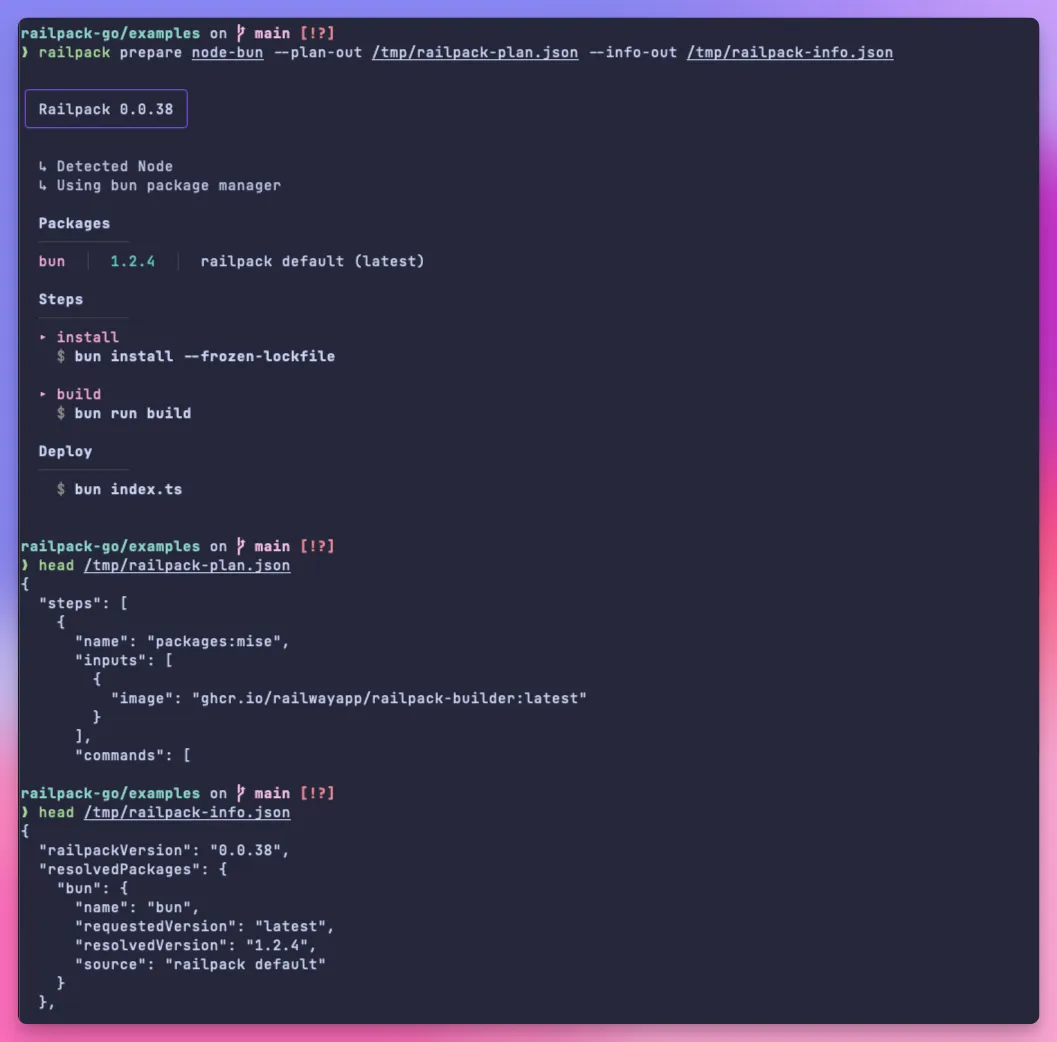
## Building with BuildKit
[Section titled “Building with BuildKit”](#building-with-buildkit)
Each version of Railpack includes a BuildKit frontend available as an [image on ghcr](https://github.com/railwayapp/railpack/pkgs/container/railpack-frontend). It is recommended to use the same version of the frontend that was used to generate the build plan.
You can build with Docker by specifying a [custom syntax](https://docs.docker.com/build/buildkit/frontend/). BuildKit **must** be enabled. Pass the path to the build plan file with the `-f` flag (it does not need to be in the same directory as the app being built).
```sh
docker buildx build \
--build-arg BUILDKIT_SYNTAX="ghcr.io/railwayapp/railpack-frontend" \
-f /path/to/railpack-plan.json \
/path/to/app/to/build
```
Alternatively, you can build with BuildKit directly.
```sh
buildctl build \
--local context=/path/to/app/to/build \
--local dockerfile=/path/to/dir/containing/railpack-plan.json \
--frontend=gateway.v0 \
--opt source=ghcr.io/railwayapp/railpack-frontend \
--output type=docker,name=test
```
Building with the Docker or BuildKit command is useful because you can pass any additional flags you want to the build, without them having to be supported by the Railpack CLI.
## Secrets
[Section titled “Secrets”](#secrets)
The secrets that are available to commands in the build must be specified in the build plan. You can pass secrets to the `prepare` command with the `--env` flag.
```sh
railpack prepare /dir/to/build --env STRIPE_LIVE_KEY=sk_live_asdf
```
These secrets can be used to configure the plan, but the names will also be included in the build plan itself (not the values). This is important so that the frontend knows what secrets to mount as environment variables when generating the LLB.
To include the values of the secrets for the build, you can pass them as [Docker build secrets](https://docs.docker.com/build/building/secrets/).
```sh
STRIPE_LIVE_KEY=asdfasdf docker build \
--build-arg BUILDKIT_SYNTAX="ghcr.io/railwayapp/railpack-frontend" \
-f /path/to/railpack-plan.json \
--secret id=STRIPE_LIVE_KEY,env=STRIPE_LIVE_KEY \
/path/to/app/to/build
```
*Note how the secret is available to docker build at the start and also passed through the `--secret` flag.*
### Layer invalidation
[Section titled “Layer invalidation”](#layer-invalidation)
By default, layers will not be invalidated when a secret value changes. To get around this, Railpack uses a hash of the secret values and mounts this as a file in the layer. When using the Railpack CLI to build, this happens automatically, but if you are using the frontend directly, calculate the hash yourself and pass it as a build arg.
```sh
--build-arg secrets-hash=
```
## Mount cache ID
[Section titled “Mount cache ID”](#mount-cache-id)
By default, the cache ID is the directory that is being cached. If you are building in a multi-tenant environment, you will likely want to isolate the mount caches. You can do this by passing a `cache-key` as a build arg. The cache key will be prefixed to all mount cache IDs used.
```sh
--build-arg cache-key=
```
## Full example
[Section titled “Full example”](#full-example)
This is a small script that will build an app using the Railpack frontend.
```sh
#!/bin/bash
APP_DIR=my-app
# Prepare the app and generate the build plan
railpack prepare $APP_DIR \
--plan-out ./railpack-plan.json \
--info-out ./railpack-info.json
# Compute the hash of the secret values
secrets_hash=$(
echo -n "STRIPE_LIVE_KEY=sk_live_asdf" |
sha256sum |
awk '{print $1}'
)
# Build with BuildKit and the Railpack frontend
docker buildx build \
--build-arg BUILDKIT_SYNTAX="ghcr.io/railwayapp/railpack-frontend" \
-f ./railpack-plan.json \
--build-arg secrets-hash=$secrets_hash \
--output type=docker,name=test \
$APP_DIR
```
# CLI Reference
> Complete reference for the Railpack CLI commands
Complete reference documentation for all Railpack CLI commands.
## Common Options
[Section titled “Common Options”](#common-options)
The following options are available across multiple commands:
| Flag | Description |
| ----------------------- | -------------------------------------------------------------------------------------------------------------------------- |
| `--env` | Environment variables to set. Format: `KEY=VALUE` |
| `--previous` | Versions of packages used for previous builds. These versions will be used instead of the defaults. Format: `NAME@VERSION` |
| `--build-cmd` | Build command to use |
| `--start-cmd` | Start command to use |
| `--config-file` | Path to config file to use |
| `--error-missing-start` | Error if no start command is found. Enabled by default on Railway. |
## Commands
[Section titled “Commands”](#commands)
### build
[Section titled “build”](#build)
Builds a container image from a project directory using BuildKit.
**Usage:**
```bash
railpack build [options] DIRECTORY
```
**Options:**
| Flag | Description | Default |
| -------------- | --------------------------------------------------------------------------- | ------- |
| `--name` | Name of the image to build | |
| `--output` | Output the final filesystem to a local directory | |
| `--platform` | Platform to build for (e.g. linux/amd64, linux/arm64) | |
| `--progress` | BuildKit progress output mode (auto, plain, tty) | `auto` |
| `--show-plan` | Show the build plan before building | `false` |
| `--cache-key` | Unique id to prefix to cache keys | |
| `--cache-from` | External cache sources (same as docker buildx). e.g. type=registry,ref=… | |
| `--cache-to` | Cache export destinations (same as docker buildx). e.g. type=registry,ref=… | |
| `--no-cache` | Do not use cache when building (boolean flag) | `false` |
`railpack build` uses credentials from your Docker CLI config (`$DOCKER_CONFIG`, default `~/.docker/config.json`) so BuildKit can pull or push private registry images. Log in with `docker login` first if needed.
### prepare
[Section titled “prepare”](#prepare)
Generates build configuration files without performing the actual build. This is useful for platforms that want to:
* Build with a custom frontend and need to save the build plan to a `railpack-plan.json` file
* Log the Railpack pretty output to stdout
* Save the additional build information for later use
**Usage:**
```bash
railpack prepare [options] DIRECTORY
```
**Options:**
| Flag | Description |
| ------------ | ----------------------------------------------------- |
| `--plan-out` | Output file for the JSON serialized build plan |
| `--info-out` | Output file for the JSON serialized build result info |
### plan
[Section titled “plan”](#plan)
Analyzes a directory and outputs the build plan that would be used.
**Usage:**
```bash
railpack plan [options] DIRECTORY
```
**Options:**
| Flag | Description |
| ------------- | ----------------------------- |
| `--out`, `-o` | Output file name for the plan |
### info
[Section titled “info”](#info)
Provides detailed information about a project’s detected configuration, dependencies, and build requirements.
**Usage:**
```bash
railpack info [options] DIRECTORY
```
**Options:**
| Flag | Description | Default |
| ---------- | ---------------------------- | -------- |
| `--format` | Output format (pretty, json) | `pretty` |
| `--out` | Output file name | |
### schema
[Section titled “schema”](#schema)
Outputs the JSON schema for Railpack configuration files, used by IDEs for autocompletion and validation.
**Usage:**
```bash
railpack schema
```
### completion
[Section titled “completion”](#completion)
Generates shell completion scripts for your preferred shell.
**Usage:**
```bash
railpack completion [bash|zsh|fish|pwsh]
```
#### Setup
[Section titled “Setup”](#setup)
The most reliable way to enable completion is to source it directly in your shell configuration file.
**Zsh** Add this to your `~/.zshrc`:
```bash
source <(railpack completion zsh)
```
**Bash** Add this to your `~/.bashrc`:
```bash
source <(railpack completion bash)
```
**Fish** Add this to your `~/.config/fish/config.fish`:
```fish
railpack completion fish | source
```
#### Advanced: Zsh Plugin Managers
[Section titled “Advanced: Zsh Plugin Managers”](#advanced-zsh-plugin-managers)
If you use a plugin manager like **Zinit**, you can load the completion without cloning the entire repository by using a snippet to point directly to the plugin file:
```zsh
zinit ice wait'0'
zinit snippet https://raw.githubusercontent.com/railwayapp/railpack/main/railpack.plugin.zsh
```
### frontend
[Section titled “frontend”](#frontend)
Starts the BuildKit GRPC frontend server for internal build system use.
**Usage:**
```bash
railpack frontend
```
## Global Options
[Section titled “Global Options”](#global-options)
These options can be used with any command:
| Flag | Description |
| ----------------- | ------------------------ |
| `--help`, `-h` | Show help information |
| `--version`, `-v` | Show version information |
| `--verbose` | Enable verbose logging |